Tilesets
Tilesets
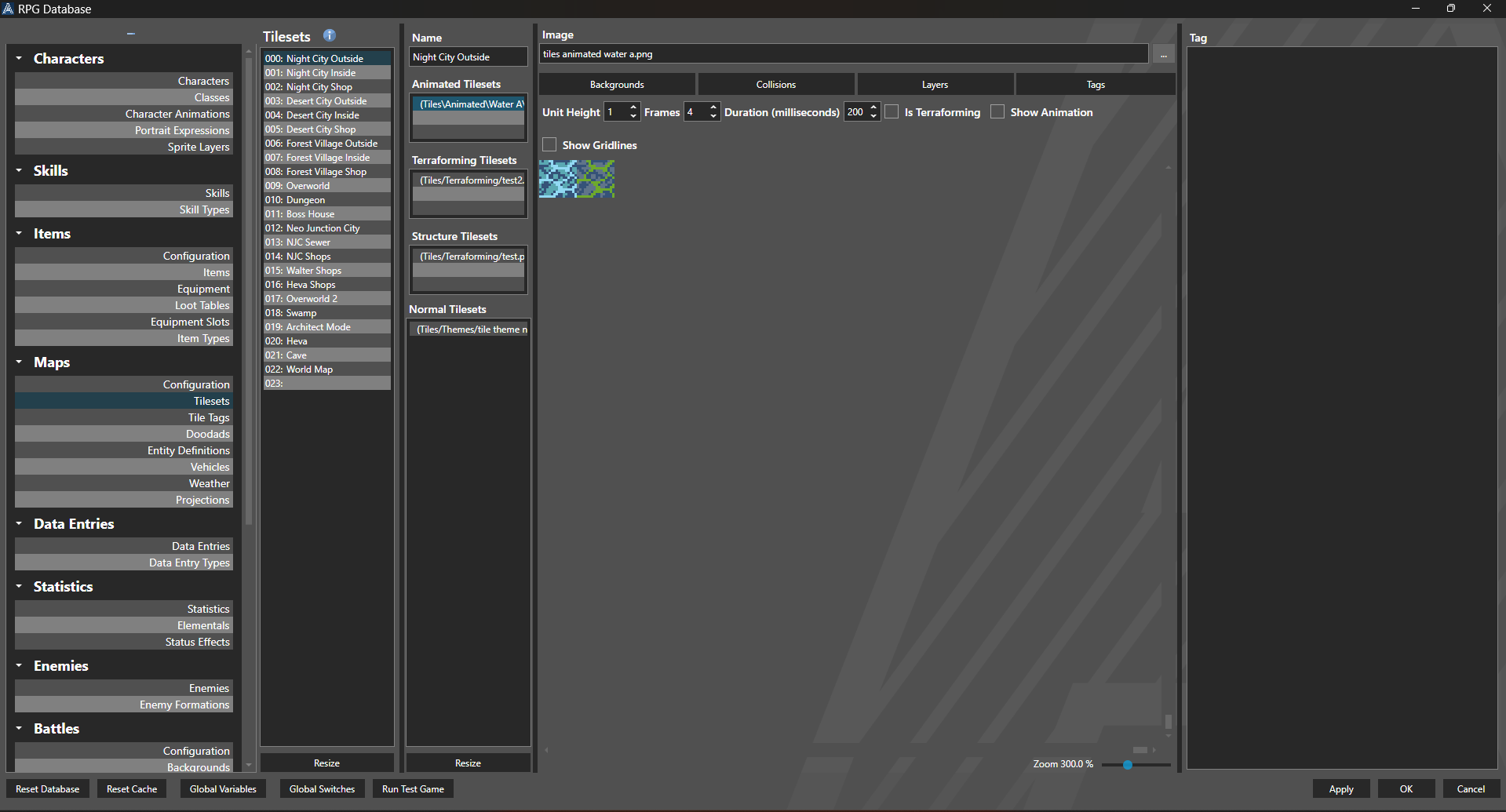
Tilesets are images that are used to draw and transform tiles on a map. For more information on the format of each Tileset, check out the Tileset Format guide.
Properties
Properties
| Name | Explanation | Type |
|---|---|---|
| Name | The name of the Tileset. | String |
| Animated Tilesets | The animated Tileset slots. | Animated Tileset Format |
| Terraforming Tilesets | The terraforming Tileset slots. | Terraforming Tileset Format |
| Structural Tilesets | The structural Tileset slots. | Structure Tileset Format |
| Normal Tilesets | The normal Tileset slots. | Flat Tileset Format |
Each of the Tileset types are limited to three slots, with the exception of Normal Tilesets, which allows for an unlimited amount. Upon selecting a Tileset slot, the Tileset editor pane is opened, which allows for setting the following:
Tileset Slot Properties
| Name | Explanation | Type |
|---|---|---|
| Image | The image associated with the selected Tileset slot. | Tileset Format |
| Collisions | Enables the collision editor. | Toggle |
| Layers | Enables the Layer editor. | Toggle |
| Tags | Enables the Tile Tag editor. | Toggle |
| Show Gridlines | Whether or not to show grid lines of the respective Tileset type. | Toggle |
| Unit Height | The scalar to apply to a tile with height. | Number |
Note: This effectively multiplies the height of a tile to create "shorter" or "taller" heights. For example if a tile is specified to have a Height of 2, and the Unit Height is .25, the tile will render at a height of .5 (2 x .25).
Animated Tileset Slot Properties
| Name | Explanation | Type |
|---|---|---|
| Frames | The number of animation frames the Tileset slot contains. | Number |
| Duration (milliseconds) | The duration of each frame in milliseconds. | Number |
| Is Terraforming | Whether or not the slot should terraform. | Toggle |
| Show Animation | Whether or not to visualize the animation in the editor. | Toggle |
Structural Tileset Slot Properties
| Name | Explanation | Type |
|---|---|---|
| Wall Height | The height of the wall component in tiles. | Number |
| Use Diagonal Edges When Terraforming | Whether or not to use diagonal edges on corners. | Toggle |
Editor Modes
| Name | Explanation |
|---|---|
| Left Click | Increments or sets the current value. |
| Right Click | Decrements the current value. |
| Middle Click | Resets the current value to default. |
Collision Mode Collision mode allows a user to specify whether or not a tile can be passed. Tiles that cannot be passed are crossed out. This is primarily useful for 2D games that do not make use of 3D colliders.
Layers Mode Layers mode allows for a user to specify the relative layer a tile should be placed on. An up arrow indicates that the tile will be drawn one layer above the current, if available. A down arrow indicates that the tile will be drawn one layer below the current, if available. This is primarily useful for 2D games where a tile may be used as a ceiling or a floor, rather than on the same layer the player is on.
Tags Mode Tags mode allows for a user to specify the Tile Tag associated with the tile, to create additional effects.