Backgrounds
(Done on my end just needs touch up.)
Backgrounds
Backgrounds are the method of displaying a battle. Depending on the configuration of the Battle, backgrounds will render differently.
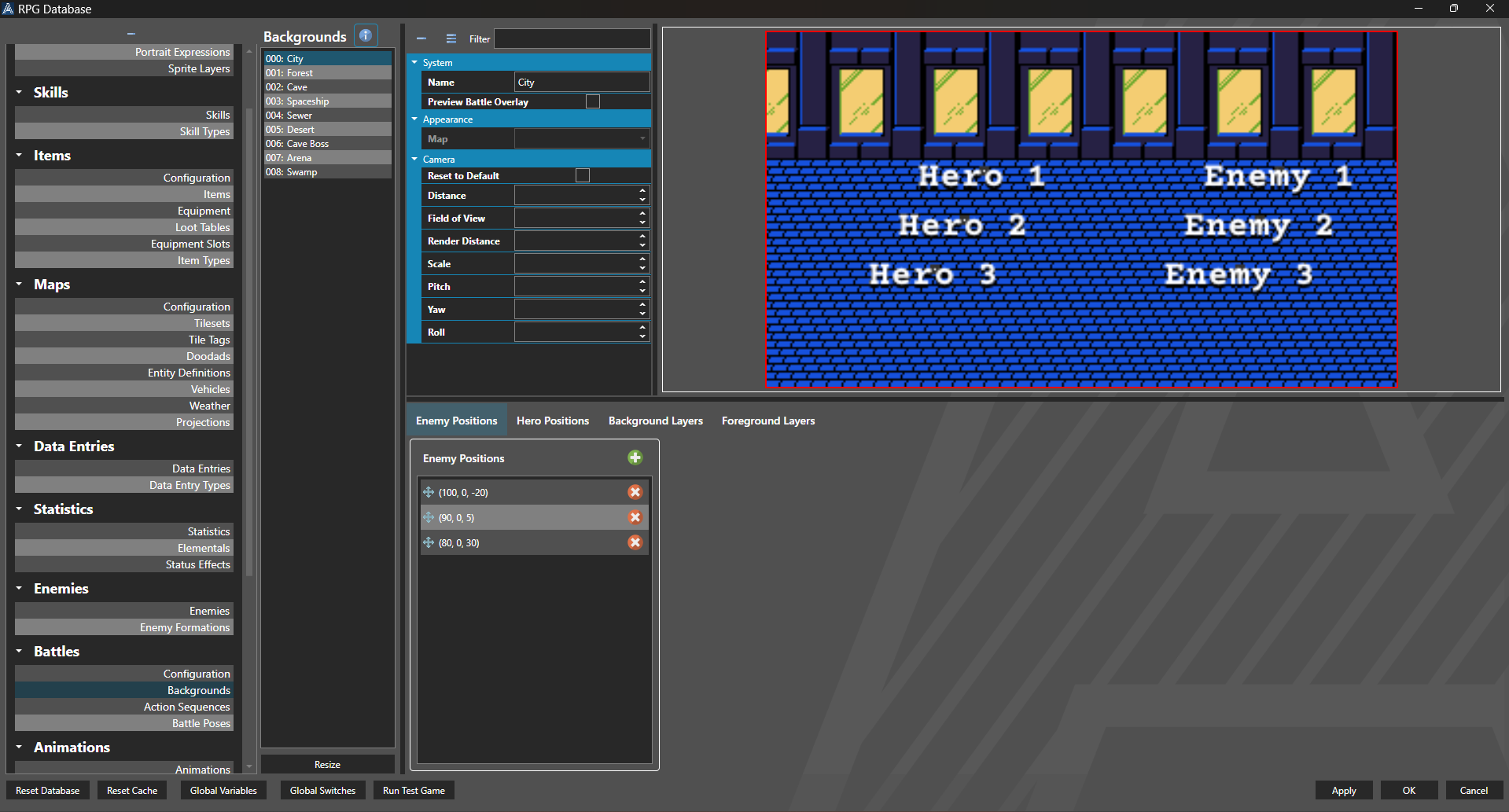
Occurs on Current Map
Background Layers and Foreground Layers are ignored. Hero Positions and Enemy Positions are measured in tile coordinates. Map is used only for sampling the background. The battle will take place around a Battle Focal Point on a Map. Camera is ignored if the map is rendering in 2D.
Occurs on External Map
Background Layers and Foreground Layers are ignored. Hero Positions and Enemy Positions are measured in tile coordinates. Map will be used as the background in game. The battle will take place around the first Battle Focal Point on the Map. Camera is ignored if the map is rendering in 2D.
Occurs on User Interface
Background Layers and Foreground Layers are used in either pixel or relative screen coordinates. Hero Positions and Enemy Positions are measured in pixel offsets from the center of the screen. Map is ignored. Camera is ignored.
Properties
System
| Name | Explanation | Type |
|---|---|---|
| Name | The name of the background. | String |
| Preview Battle Overlay | Whether or not to include the battle overlay in preview. | Toggle |
Appearance
| Name | Explanation | Type |
|---|---|---|
| Map | The map to leverage for a battle. | Map |
Camera
| Name | Explanation | Type |
|---|---|---|
| Reset to Default | Whether or not to reset the default values of the camera. | Toggle |
| Distance | The overridden distance of the camera if applicable. | Number |
| Field of View | The overridden field of view of the camera if applicable. | Number |
| Render Distance | The overridden render distance of the camera if applicable. | Number |
| Scale | The overridden scale of the camera if applicable. | Number |
| Pitch | The overridden pitch of the camera if applicable. | Number |
| Yaw | The overridden uyaw of the camera if applicable. | Number |
| Roll | The overridden roll of the camera if applicable. | Number |
Map Layer Element
System
| Name | Explanation | Type |
|---|---|---|
| Name | The name of the layer. | String |
Appearance
| Name | Explanation | Type |
|---|---|---|
| Image | The static image associated with the layer. | Image |
| Use Sprite | Whether or not to use a sprite instead of image. | Toggle |
| Sprite | The sprite associated with the layer. | Sprite or Model |
Position
| Name | Explanation | Type |
|---|---|---|
| Use Relative Positioning | Whether or not to use relative positioning and sizing for the element. | Toggle |
| Pixel X | The x coordinate in pixels of the element. | Number |
| Pixel Y | The y coordinate in pixels of the element. | Number |
| Pixel Width | The width in pixels of the element. | Number |
| Pixel Height | The height in pixels of the element. | Number |
| Relative X | The x coordinate relative to the container of the element. | Number |
| Relative Y | The y coordinate relative to the container of the element. | Number |
| Relative Width | The width relative to the container of the element. | Number |
| Relative Height | The height relative to the container of the element. | Number |
Position
System
| Name | Explanation | Type |
|---|---|---|
| Name | The name of the position. | String |
Position
| Name | Explanation | Type |
|---|---|---|
| X | The x coordinate of the position. | Number |
| Y | The y coordinate of the position. | Number |
| Z | The z coordinate of the position. | Number |