Configuration
Battle Configuration
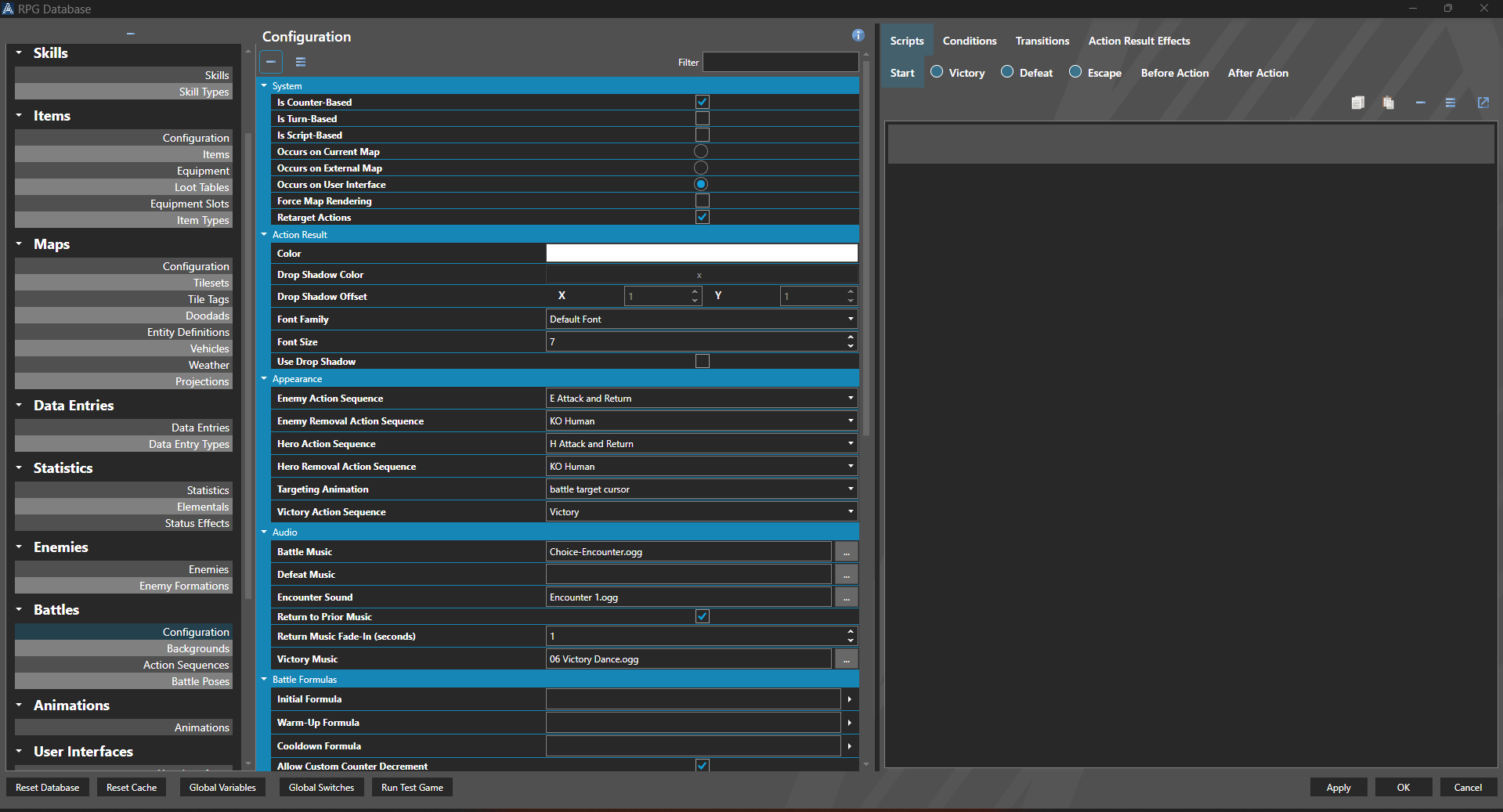
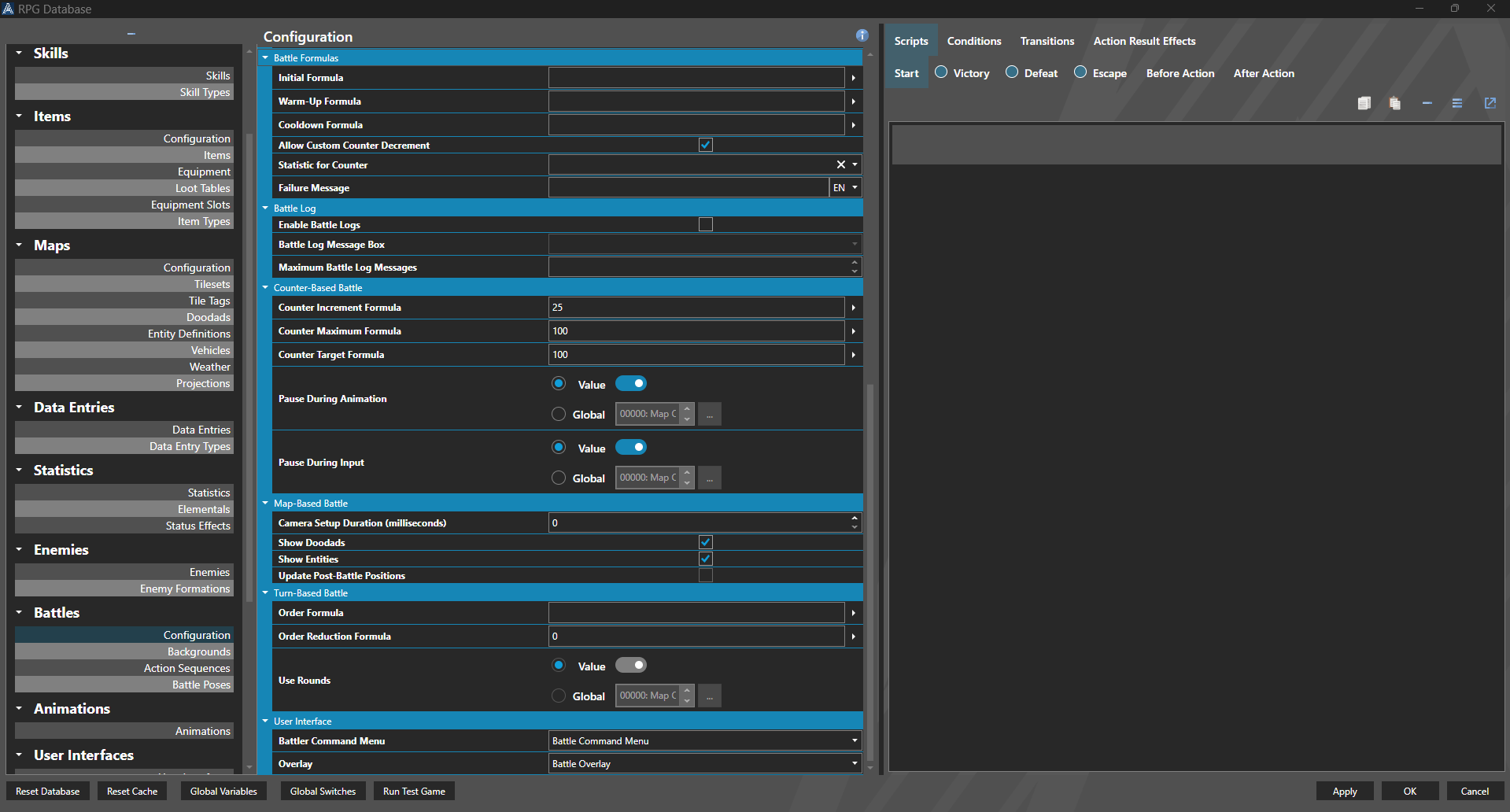
Battle configuration is used to setup how the battle system functions in your game.
The battle system in RPG Architect is very customizable. Action turn based systems, which use a counter based on a Statistic as a timer between actions in a battle, like many popular RPGs, and turn based style systems, where turn order is simply decided in advance by a Statistic are available as default options. To enable a action turn based system, select 'Is Counter-Based', and define the statistic you want to use for your Counter. For a traditional turn-based system, select Turn-Based. More advanced users can use a battle system based on a custom script, by using Use Script-Based.
From there, you can select whether the Battles will take place on the current map, an external map, or on the user interface.
Current and external maps take place on Battle Focal Points. This means the background of the battle will be rendered in-engine, on a map - whether it's the current map the player is on, or whether it uses a different map to the one the player is currently on.
User Interface Battles are intended for battles that take place entirely on a user interface - for example, battles in the style of blobber-type games.
Properties
System
| Name | Explanation | Type |
|---|---|---|
| Is Counter-Based | Whether or not the Battlers act independently on a timer instead of turns. | Toggle |
| Is Turn-Based | Whether or not the Battlers act based on turns. | Toggle |
| Is Script-Based | Whether or not the Battlers act based on a script. | Toggle |
| Occurs on Current Map | Whether or not the battle takes place on the same place that the encounter was registered. | Toggle |
| Occurs on External Map | Whether or not the battle takes place on an external map from where the encounter was registered. | Toggle |
| Occurs on User Interface | Whether or not the battle takes place as a 2D projection like the user interface. | Toggle |
| Force Map Rendering | Whether or not the prior map scene should render in the background of the user interface battle. | Toggle |
| Retarget Actions | Retargets an action or sequence when the target is no longer available. | Toggle |
Action Result
| Name | Explanation | Type |
|---|---|---|
| Color | The color of the action result. | Color |
| Drop Shadow Color | The color of the drop shadow of the action result. | Color |
| Drop Shadow Offset | The offset of the drop shadow of the action result. | Number |
| Effects | The effects to apply to the action result. | Annotation Effect |
| Font Family | The font family of the action result. | Font Family |
| Font Size | The font size of the action result. | Number |
| Use Drop Shadow | Whether or not to display a drop shadow on the action result. | Toggle |
Appearance
| Name | Explanation | Type |
|---|---|---|
| Enemy Action Sequence | The default Action Sequence to use for enemies when they are removed from battle. | Action Sequence |
| Enemy Removal Action Sequence | The default Action Sequence to use for enemies. | Action Sequence |
| Hero Action Sequence | The default Action Sequence to use for heroes. | Action Sequence |
| Hero Removal Action Sequence | The default Action Sequence to use for heroes when they are removed from battle. | Action Sequence |
| Targeting Animation | The default animation to use when selecting a target. | Animation |
| Victory Action Sequence | The Action Sequence to use when victory occurs. | Action Sequence |
Audio
| Name | Explanation | Type |
|---|---|---|
| Battle Music | The music to play during battle. | Music |
| Defeat Music | The music to play upon defeat in battle. | Music |
| Encounter Sound | The sound effect to play when a battle begins. | Sound Effect |
| Return to Prior Music | Whether or not to resume the music from the scene prior to battle. | Toggle |
| Return Music Fade-In (seconds) | The duration to take when resuming music from the prior scene in seconds. | Number |
| Victory Music | The music to play upon victory in battle. | Music |
Battle Formulas
| Name | Explanation | Type |
|---|---|---|
| Initial Formula | The formula to use to determine the initial order of battles. | Formula |
| Warm-Up Formula | The default formula to use before a Battler acts to calculate the delay before the action begins. | Formula |
| Cooldown Formula | The default formula to use after a Battler acts to calculate the delay before they can begin to act again. | Formula |
| Allow Custom Counter Decrement | Decrements the counter or turn by the value provided in the user effect. | Toggle |
| Statistic for Counter | The statistics property for storing the current counter or turn order value into. | Statistics |
| Failure Message | The message that shows when an action fails. | String |
Battle Log
| Name | Explanation | Type |
|---|---|---|
| Enable Battle Logs | Whether or not to label battle logs displaying. | Toggle |
| Battle Log Message Box | The message box to display the battle log in. | (needs work) |
| Maximum Battle Log Messages | The maximum number of messages to maintain in the battle log. | Number |
Counter-Based Battle
| Name | Explanation | Type |
|---|---|---|
| Counter Increment Formula | The formula to calculate how quickly a Battler accumulates their counter. | Formula |
| Counter Maximum Formula | The formula to calculate how high a Battler can accumulate their counter. | Formula |
| Counter Target Formula | The formula to calculate how soon a Battler can act based on their counter. | Formula |
| Pause During Animation | Whether or not to pause counter accumulation during animations. | Switch or Value |
| Pause During Input | Whether or not to pause counter accumulation during input. | Switch or Value |
Map-Based Battle
| Name | Explanation | Type |
|---|---|---|
| Camera Setup Duration (milliseconds) | The duration of time to setup the camera at the start of a battle. | Number |
| Show Doodads | Whether or not to render doodads in map based battles. | Toggle |
| Show Entities | Whether or not to render entities in map based battles. | Toggle |
| Update Post-Battle Positions | Whether or not to set hero positions to the end results of the battle during a current map based battle. | Toggle |
Turn-Based Battle
| Name | Explanation | Type |
|---|---|---|
| Order Formula | The formula to calculate the order Battlers follow for their turn. | Formula |
| Order Reduction Formula | The formula to calculate how much a battle has their order reduced upon acting. | Formula |
| Use Rounds | Whether or not all actions are entered in advance for available Battler turns. | Switch or Value |
User Interface
| Name | Explanation | Type |
|---|---|---|
| Battler Command Menu | The menu to display when a Battler is entering their action. | User Interface |
| Overlay | The overlay that displays the current battle information. | User Interface |
Transitions
| Name | Explanation | Type |
|---|---|---|
| Enter Transition | The transition for entering the scene. | Transition |
| Exit Transition | The transition for exiting the scene. | Transition |
Conditions and Scripts
| Name | Explanation | Type |
|---|---|---|
| Defeat Conditions | The conditions to determine when defeat occurs. | Battle Condition |
| Defeat Script | The script to execute upon defeat. | Script |
| Victory Conditions | The conditions to determine when victory occurs. | Battle Condition |
| Victory Script | The script to execute upon victory. | Script |