Title
Title
Title defines the project's title screen — the first thing the player sees when launching the game. It controls the background visuals and music, the menu UI displayed over them, the transition effects used to enter and leave the title, and the scripts that run as the title comes up and is dismissed.
The settings here are configured once early in development to lock in the first impression the game makes when it starts up.
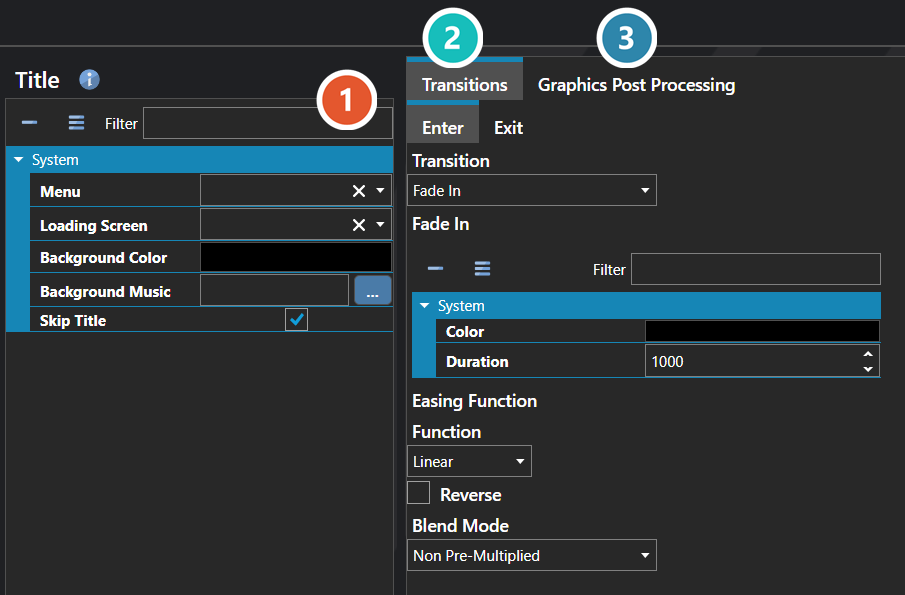
 Properties
The title screen's own fields. Every one of them is listed under Properties further down this page.
 Transitions
How the screen animates in and out. Each direction is configured separately — see Transition Editor.
 Graphics Post Processing
Effects applied over the finished frame, applied in the order listed — see Graphics Post Processor Editor.
Note: The title screen is not mandatory — enabling Skip Title bypasses it entirely and drops the player straight into a new game, which is useful for projects that want to launch directly into a custom intro. A title can also be used to stage a pre-menu sequence by having the title's flow transition into a temporary map first, allowing a cinematic, intro scene, or animated logo to play out before the actual menu appears.
Properties
System
| Name | Explanation | Type |
|---|---|---|
| Background Color | The background color of the scene. | Color |
| Background Music | The background music to play. | Music |
| Enter Transition | The scene transition played when entering. | Scene Transition |
| Exit Transition | The scene transition played when exiting. | Scene Transition |
| Graphics Post Processors | The post-processing effects applied to the scene. | Graphics Post Processor |
| Loading Screen | The user interface to use for the loading screen for the scene. | User Interface |
| Menu | The user interface to use for the scene. | User Interface |
| Skip Title | When enabled, the title screen is bypassed entirely and the game proceeds directly to starting a new game. | Toggle |