Prefabs
Prefabs
Prefabs are reusable, hand-authored map objects that can be built once and placed any number of times. A two-dimensional prefab is a small footprint of tiles across up to three relative layers that stamps directly onto a map's terrain. A three-dimensional prefab is a mesh, authored vertex-by-vertex and textured from a single image, that is placed into a map as a live instance.
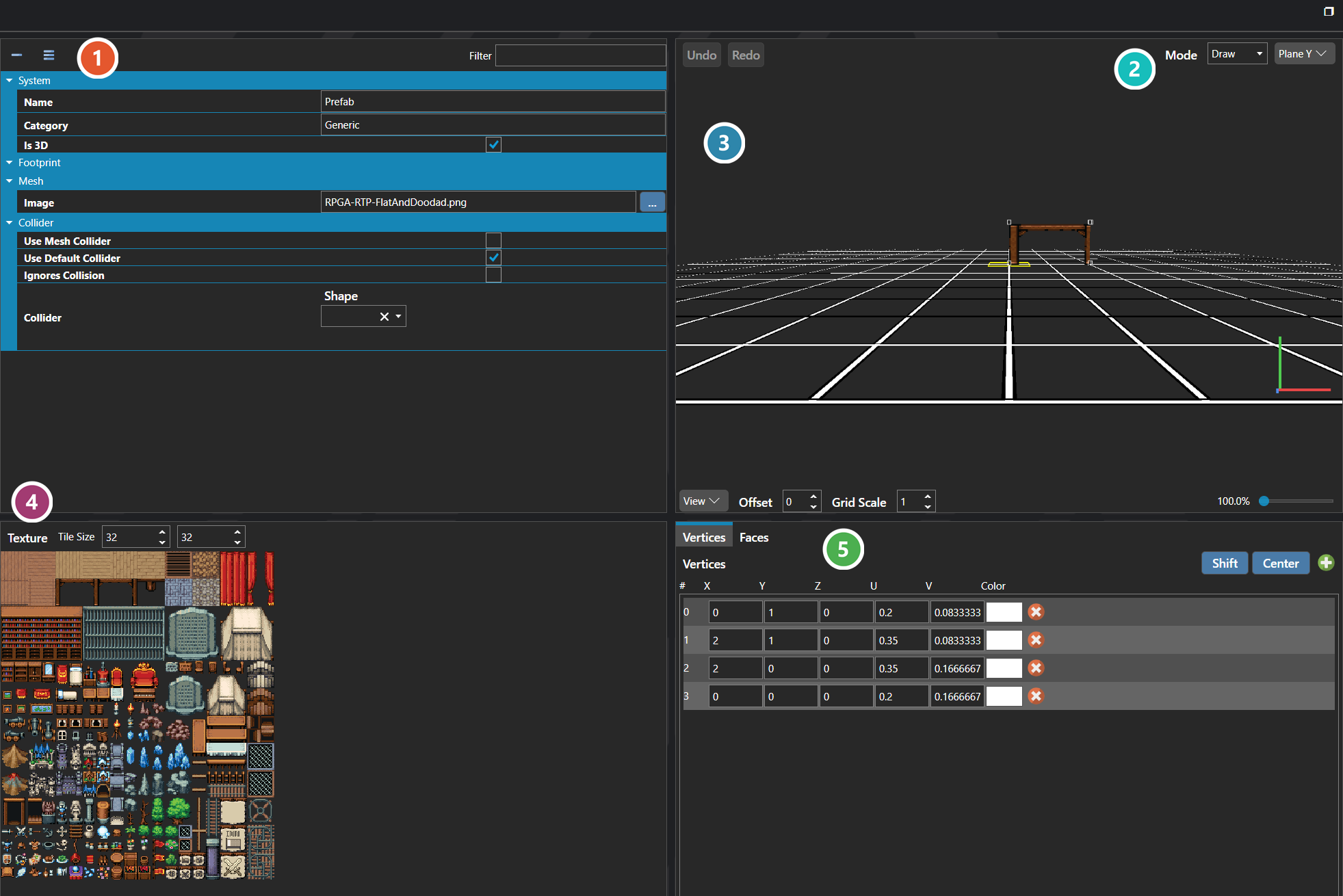
 Properties
The prefab's own fields — its name and category, whether it is 3D, its footprint, the image its mesh is textured from, and its collider. Every one of them is listed under Properties further down this page.
 Mode
Mode
What a click on the surface does, and which plane it acts on. Undo and Redo at the far left apply to the geometry, not to the fields.
 Editing Surface
Where the prefab is actually built. It is a drawn surface rather than a form, so geometry is placed and reshaped directly with the mouse; the bar beneath it controls the view, the grid and the zoom rather than the prefab itself.
 Texture
The image the prefab's faces are textured from, cut into tiles of the size set beside it. Picking a tile here chooses what gets painted onto the surface.
 Vertices and Faces
The same geometry as numbers. Vertices lists each point's position along with its U and V coordinates into the texture and a colour, so a value can be typed exactly rather than dragged; Faces switches to the surfaces built between those points.
Note: Whether a prefab is authored as a tile stamp or a mesh is determined by whether the project is two- or three-dimensional; the Is 3D flag records which payload the prefab uses.
Properties
System
| Name | Explanation | Type |
|---|---|---|
| Category | The category of organization for the prefab. | String |
| Collider | The settings for the dimensions of the prefab collider. Values are measured in tiles. | Collider |
| Collider Points | The relative X, Y, Z coordinates of the prefab for collision purposes. | Vector |
| Is 3D | Whether the prefab is authored as a three-dimensional mesh instead of a two-dimensional tile stamp. | Toggle |
| Name | The name of the prefab. | String |
Collider
| Name | Explanation | Type |
|---|---|---|
| Ignores Collision | Whether the prefab ignores all collisions. | Toggle |
| Use Default Collider | Whether the prefab should use the default collider specified in the Map Configuration. | Toggle |
| Use Mesh Collider | Whether the collider is generated from the prefab's mesh geometry. When disabled, the authored collider is used instead. | Toggle |