Weather
Weather
Weather effects are reusable, script-driven environmental overlays that play on top of a map — rain, snow, fog, sandstorms, falling leaves, ash, magical auras, and any other ongoing visual effect that should affect the entire scene. A weather effect bundles together a screen animation, the scripts that run when it starts, persists, and ends, and a set of input switches and variables that let the same effect be parameterized at runtime.
Weather is fully script-driven, which means a single Weather definition can produce many different in-game variants by passing different inputs — a "Rain" weather effect, for example, can be light or heavy, with or without lightning, depending on the switches and variables it is started with.
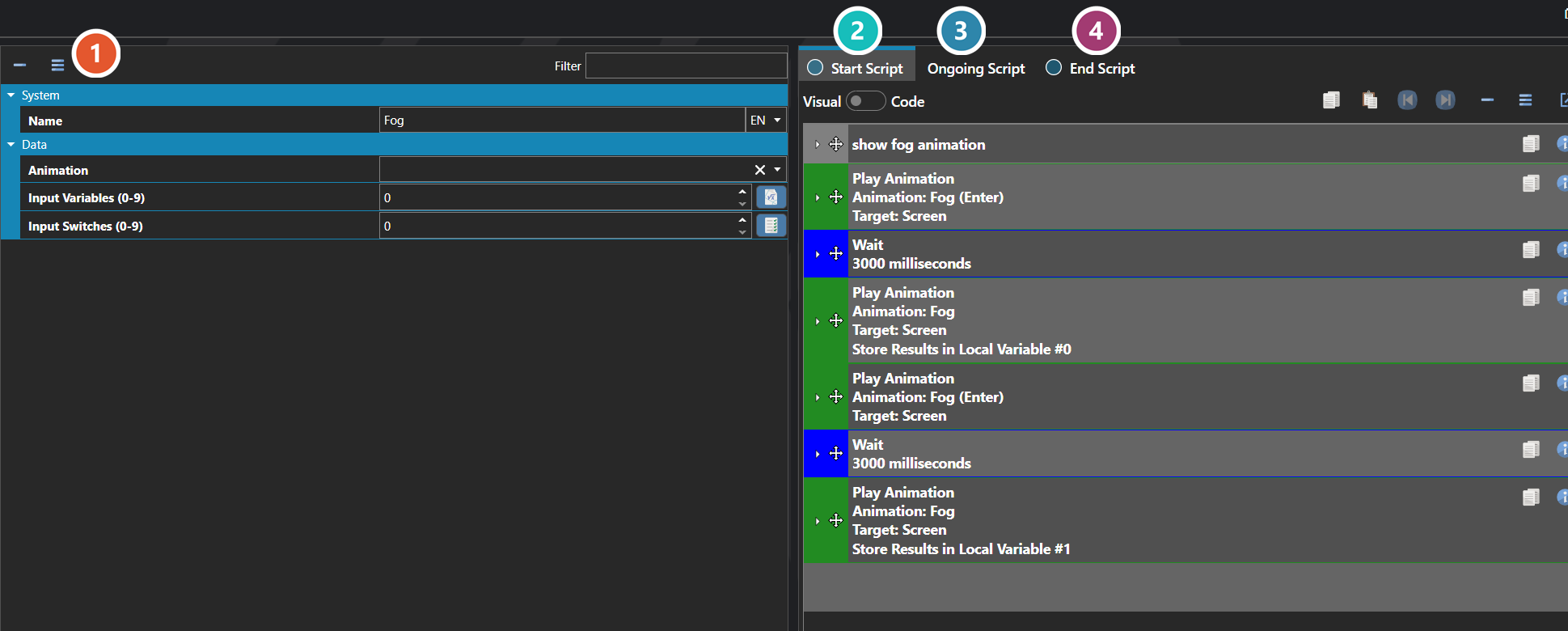
 Properties
The weather effect's own fields — the screen animation it plays, and the input switches and variables that let one definition be reused for several in-game variants. Every one of them is listed under Properties further down this page.
 Start Script
Runs once when the weather begins — see Script Editor.
 Ongoing Script
Runs repeatedly while the weather persists, and is where the effect itself is driven.
 End Script
Runs once as the weather stops, for anything that needs clearing up.
Note: The Enter Script runs once when the weather begins, the Ongoing Script runs continuously while it is active, and the Exit Script runs once as it ends. Use Enter and Exit for one-shot setup and teardown — fading in or out, playing a thunderclap, applying a screen tint — and Ongoing for the looping or per-frame logic that drives the effect itself.
Properties
System
| Name | Explanation | Type |
|---|---|---|
| Enter Script | The script to execute when the weather is started. | Script |
| Exit Script | The script to execute when the weather ends. | Script |
| Locals | The local data that is used in parameters. | Local and Global Data |
| Name | The name of the weather effect. | String |
| Ongoing Script | The script to execute while the weather persists. | Script |
Data
| Name | Explanation | Type |
|---|---|---|
| Animation | The animation to use on the screen for the weather effect. | Animation |
| Input Switches (0-9) | The input switches for the weather effect. | Number |
| Input Variables (0-9) | The input variables for the weather effect. | Number |