Configuration
Configuration
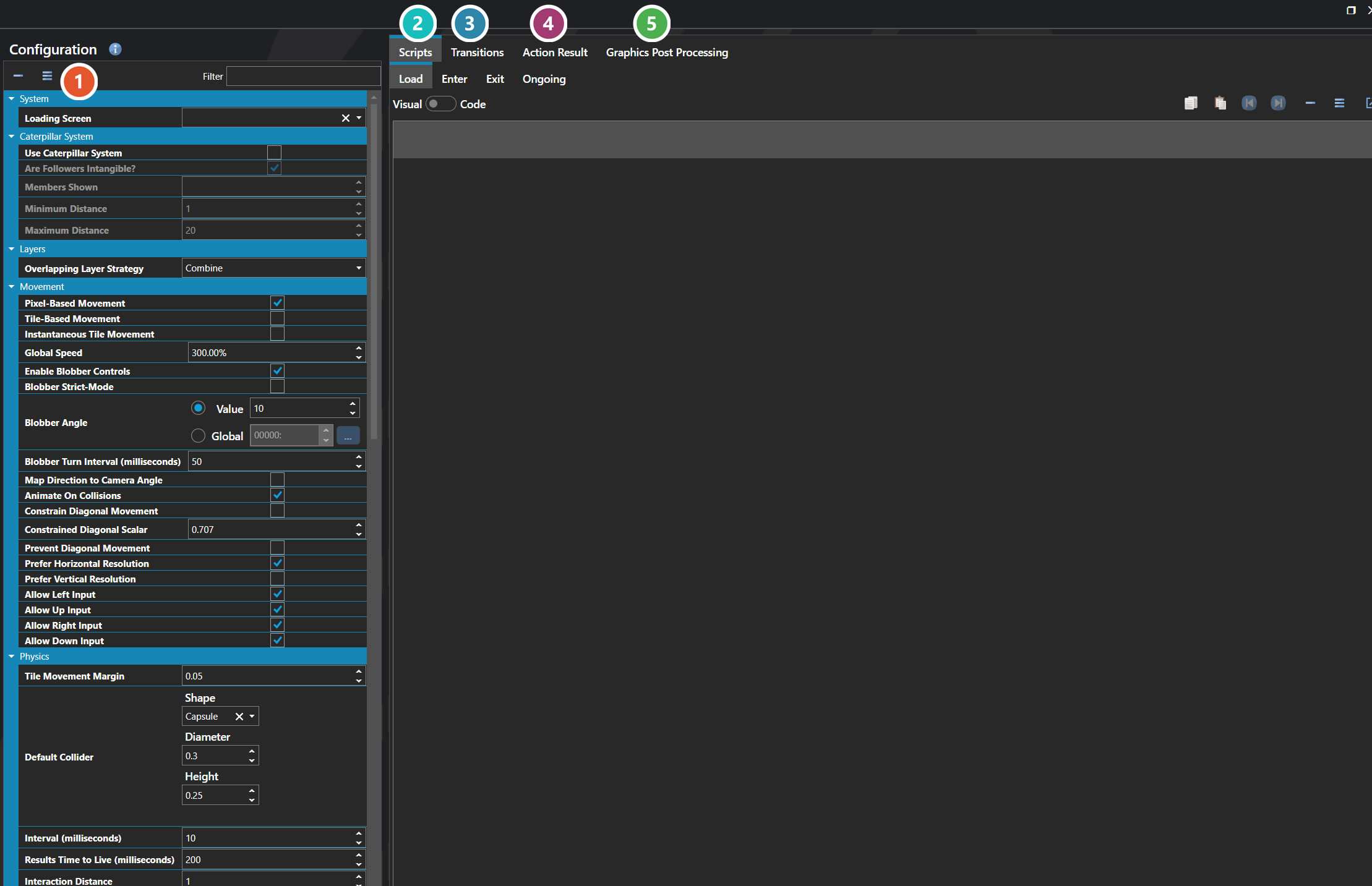
Map Configuration defines how maps work across the entire project. It is the central place that physics is configured — gravity, collision behavior, default colliders for actors and doodads — and it also controls the global rules for player and entity movement, the default camera setup, encounter behavior, pathfinding limits, and the transitions and scripts that run when maps are entered or left.
The settings here are the project-wide defaults that apply to every map unless an individual map or script overrides them. Most projects configure these once early in development to lock in how physics, movement, and exploration feel across the game.
 Properties
The project-wide map settings, grouped by topic — movement, encounters, lighting, and the rest. Every one of them is listed under Properties further down this page.
 Scripts
Four script hooks that fire around a map — Load, Enter, Exit and Ongoing. Each is edited with the Script Editor.
 Transitions
How the screen moves into and out of a map — see Transition Editor.
 Action Result
The pop-up numbers and text shown on the map when something lands — poison damage, a status effect wearing off. Set separately from the battle scene's, so the two can look different.
 Graphics Post Processing
Full-screen visual effects applied while the player is on a map — see Graphics Post Processor Editor.
Properties
System
| Name |
Explanation |
Type |
| Action Result |
The default way to display action results on the map, such as poison damage or status effect messages. |
Action Sequence Result |
| Enter Map Script |
The script executed when entering a map. |
Script |
| Enter Transition |
The scene transition played when entering. |
Scene Transition |
| Exit For Battle Transition |
The scene transition played when exiting to battle. |
Scene Transition |
| Exit Map Script |
The script executed when exiting a map. |
Script |
| Exit Transition |
The scene transition played when exiting. |
Scene Transition |
| Graphics Post Processors |
The post-processing effects applied to the scene. |
Graphics Post Processor |
| Load Map Script |
The script executed when a map loads, before the enter transition is displayed. |
Script |
| Loading Screen |
The user interface to use for the loading screen for the scene. |
User Interface |
| Ongoing Map Script |
The script that runs continuously while on the map. |
Script |
| Pathfinding Time |
The maximum time for pathfinding calculations. |
Number |
Calculations
| Name |
Explanation |
Type |
| Is Defeat/Game Over Enabled |
Whether the default defeat condition from battle configuration is checked when statistics are updated on a map. |
Toggle |
Camera
| Name |
Explanation |
Type |
| Easing Function |
The easing function that shapes how the camera catches up to what it is following, where its duration is the time taken to arrive. Instant follows without any delay. |
Easing Function |
| Maximum Distance |
The furthest the camera may trail behind what it is following. Zero applies no limit. |
Number |
Caterpillar System
| Name |
Explanation |
Type |
| Are Followers Intangible? |
Whether caterpillar followers are intangible and do not interact with physics. |
Toggle |
| Maximum Distance |
The maximum distance before a caterpillar member teleports to catch up to the leader. |
Number |
| Members Shown |
The number of caterpillar followers visible on the map. |
Number |
| Minimum Distance |
The minimum distance a caterpillar follower must be from the leader before it begins moving to follow. |
Number |
| Use Caterpillar System |
Whether to use the caterpillar system, which displays party followers trailing behind the leader on the map. |
Toggle |
Debugging
| Name |
Explanation |
Type |
| Doodad Bounding Box Color |
The color to render the bounding boxes for doodads. |
Color |
| Doodad Bounding Boxes |
Whether to render doodad bounding boxes for debugging. |
Toggle |
| Entity Bounding Box Color |
The color to render the bounding boxes for entities. |
Color |
| Entity Bounding Boxes |
Whether to render entity bounding boxes for debugging. |
Toggle |
| Fence Color |
The color used to render fence walls for debugging. |
Color |
| Fence Walls |
Whether to render fence walls for debugging. |
Toggle |
| Prefab Bounding Box Color |
The color to render the bounding boxes for prefabs. |
Color |
| Prefab Bounding Boxes |
Whether to render prefab bounding boxes for debugging. |
Toggle |
| Projection Bounding Box Color |
The color to render the bounding boxes for projections. |
Color |
| Projection Bounding Boxes |
Whether to render projection bounding boxes for debugging. |
Toggle |
| Vehicle Bounding Box Color |
The color to render the bounding boxes for vehicles. |
Color |
| Vehicle Bounding Boxes |
Whether to render vehicle bounding boxes for debugging. |
Toggle |
Layers
| Name |
Explanation |
Type |
| Overlapping Layer Strategy |
The strategy for handling duplicate tile layer data. |
Tile Overlap Strategy |
Minimap
| Name |
Explanation |
Type |
| Minimap |
The default minimap user interface displayed on maps. |
User Interface |
Movement
| Name |
Explanation |
Type |
| Allow Down Input |
Whether down input is registered on maps. |
Toggle |
| Allow Left Input |
Whether left input is registered on maps. |
Toggle |
| Allow Right Input |
Whether right input is registered on maps. |
Toggle |
| Allow Up Input |
Whether up input is registered on maps. |
Toggle |
| Animate On Collisions |
Whether the hero continues its walking animation when colliding with a wall or object. |
Toggle |
| Blobber Angle |
The angle to rotate the yaw when blobber-style controls are enabled. |
Variable or Value |
| Blobber Strict-Mode |
Whether blobber-style controls prevent forward and backward movement while turning. |
Toggle |
| Blobber Turn Interval (milliseconds) |
The fixed time that it takes to turn when blobber-style controls are enabled. |
Number |
| Constrain Diagonal Movement |
Whether to limit diagonal movement speed so it matches cardinal movement speed. |
Toggle |
| Constrained Diagonal Scalar |
The scalar to limit the diagonal movement by. The default is 0.707 or the square root of 2. |
Number |
| Enable Blobber Controls |
Whether to enable blobber-style controls for first-person camera movement. |
Toggle |
| Global Speed |
The scalar to apply to all movement. |
Number |
| Instantaneous Tile Movement |
Whether tile-based movement is instantaneous, teleporting to the next tile instead of animating. |
Toggle |
| Map Direction to Camera Angle |
Whether to map the movement direction of the controlled actor to the camera angle. |
Toggle |
| Pixel-Based Movement |
Whether pixel-based movement is enabled, allowing free movement instead of tile snapping. |
Toggle |
| Prefer Horizontal Resolution |
Whether to prefer a horizontal frame when resolving direction for sprite display. |
Toggle |
| Prefer Vertical Resolution |
Whether to prefer a vertical frame when resolving direction for sprite display. |
Toggle |
| Prevent Diagonal Movement |
Whether to prevent diagonal movement, restricting input to cardinal directions only. |
Toggle |
Physics
| Name |
Explanation |
Type |
| Default Collider |
The default entity collider shape, if applicable. |
Collider |
| Gravity |
The default gravity to apply to entities. |
Vector |
| Interaction Distance |
The distance an action key interaction searches forward. |
Number |
| Interval (milliseconds) |
The fixed interval that physics runs at. |
Number |
| Level Collision Height |
The height used to create boundaries for level geometry when a tile is marked for collision. |
Number |
| Maximum Fall Distance |
The maximum distance that something can fall and not be considered falling. |
Number |
| Prevent Falling |
Whether to actively prevent entities from falling off edges beyond the maximum fall distance. |
Toggle |
| Results Time to Live (milliseconds) |
How long the engine remembers a tile tag result when an entity briefly loses contact with the surface. |
Number |
| Slope Climbing Angle |
The maximum angle allowed for climbing slopes in degrees. |
Number |
| Strict Collision Mode |
Whether any collision prevents movement. When disabled, passable collisions are allowed through. |
Toggle |
| Tile Movement Margin |
The distance threshold for applying glue force to keep entities anchored to tiles. Also affects movement detection raycasts. |
Number |
| Name |
Explanation |
| Combine |
Combines the geometry metadata from all overlapping tile layers into a single result. |
| Use First Layer Only |
Uses only the first (bottom) layer's tile data and ignores tiles on higher layers at the same position. |
| Use Last Layer Only |
Uses only the last (top) layer's tile data and ignores tiles on lower layers at the same position. |
See Also