Vehicles
Vehicles
Vehicles are rideable transports that the party can mount to change how they traverse a map — boats that cross water, airships that fly over obstacles, horses that move faster, mine carts that follow rails, and any other transport the project needs. A vehicle defines its own appearance, movement speed, collision rules, encounter behavior, and the scripts that run as the player enters and exits it.
While riding a vehicle, the party uses the vehicle's traversal rules instead of its own — a boat can cross water tiles a hero cannot walk on, an airship can ignore collision and obstacles entirely, and a fast horse can override the base movement speed. The vehicle can also force its own music while in use, and can be configured to allow or restrict which Tile Tags it can pass over.
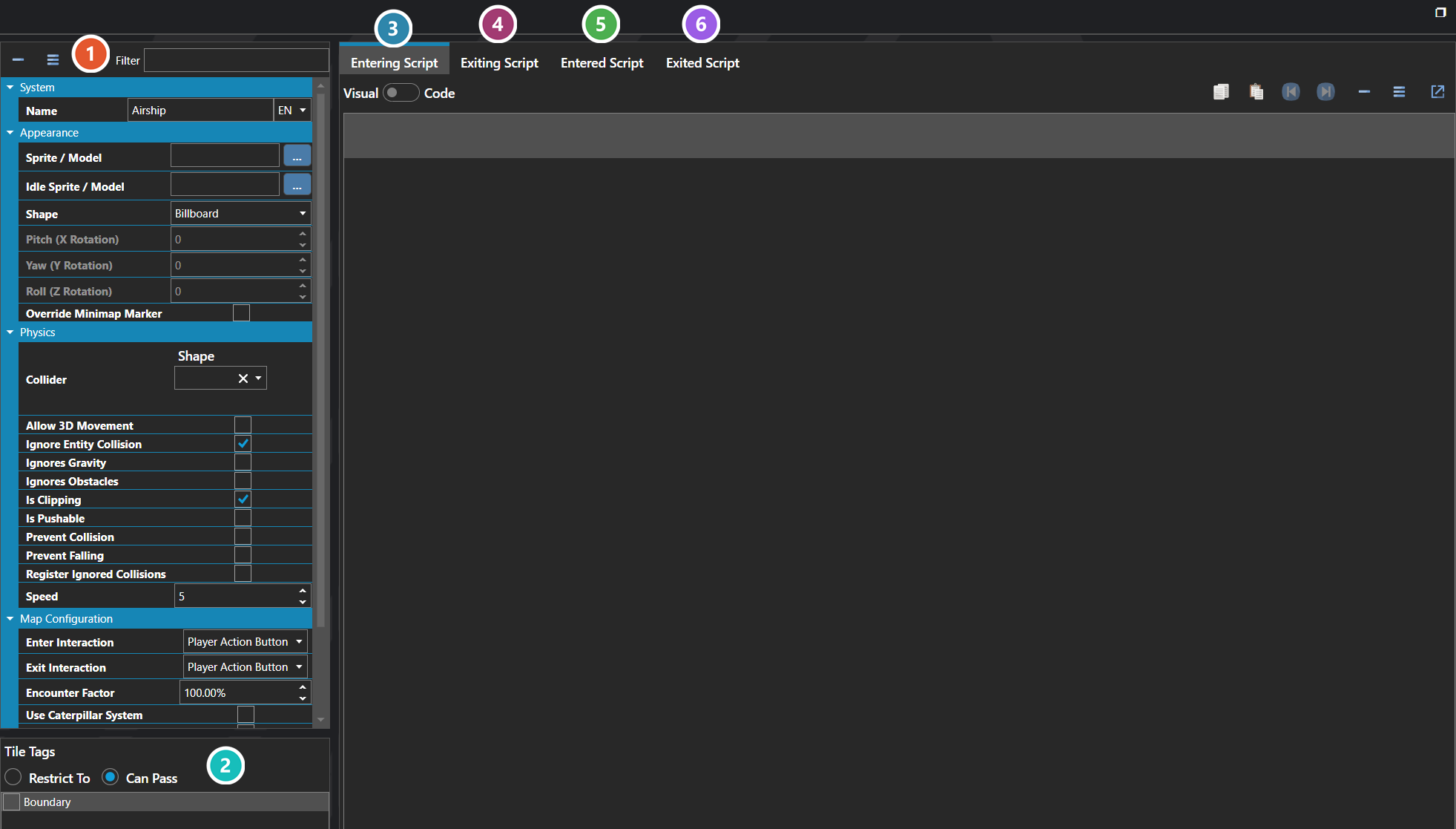
 Properties
The vehicle's own fields — its sprite or model and shape, its collider and movement flags, its speed, and how the party boards and leaves it. Every one of them is listed under Properties further down this page.
 Tile Tags
Which tiles the vehicle may travel over. Restrict To limits it to tiles carrying these tags; Can Pass instead adds them to what it can already cross — which is how an airship clears terrain a boat cannot.
 Entering Script
Runs as the party begins boarding, before it is aboard — see Script Editor.
 Exiting Script
Runs as the party begins leaving, while still aboard.
 Entered Script
Runs once the party is aboard and in control of the vehicle.
 Exited Script
Runs once the party is off and back on foot.
Note: Vehicles run a four-stage script lifecycle when the player enters or exits one — Before Enter, After Enter, Before Exit, and After Exit — which is how mounting animations, dialogue, transition effects, or eligibility checks are typically built around the actual mount and dismount.
Properties
System
| Name | Explanation | Type |
|---|---|---|
| Collider Points | The relative X, Y, Z coordinates of the vehicle collider. Values are measured in tiles. | Vector |
| Entered Script | The script that is executed after entry. | Script |
| Entering Script | The script that is executed before entry. | Script |
| Exited Script | The script that is executed after exit. | Script |
| Exiting Script | The script that is executed before exit. | Script |
| Is Tile Tag Restrictive | Whether tile tags are restricted to the selected tile tags or if they are added to, per normal. | Toggle |
| Name | The name of the vehicle. | String |
| Never Sleeps | Whether the vehicle never sleeps. | Toggle |
| Rotation | The rotation to apply to the vehicle. | Vector |
| Tile Tags | The tile tags that are traversable by the vehicle. | Tile Tag |
Appearance
| Name | Explanation | Type |
|---|---|---|
| Idle Sprite / Model | The sprite or model of the vehicle on maps when it is not being ridden. | Sprite or Model |
| Shape | The shape of the vehicle in 3D. | Sprite Shape |
| Sprite / Model | The sprite or model of the vehicle on maps when in use. | Sprite or Model |
Audio
| Name | Explanation | Type |
|---|---|---|
| Custom Music | The custom music while riding the vehicle. | Music |
| Use Custom Music | Whether to use custom music while riding the vehicle. | Toggle |
Map Configuration
| Name | Explanation | Type |
|---|---|---|
| Character Riding Animation | The animation to apply to the character when riding the vehicle. | Character Animation |
| Encounter Factor | The factor applied to encounter steps. | Number |
| Enter Interaction | The interaction to trigger entering the vehicle. | Interaction |
| Exit Interaction | The interaction to trigger exiting the vehicle. | Interaction |
| Is Character Visible | Whether the character is visible on the vehicle. | Toggle |
| Use Caterpillar System | Whether the vehicle is setup for each character in the party. | Toggle |
Physics
| Name | Explanation | Type |
|---|---|---|
| Allow 3D Movement | Whether to allow movement along the Y-plane in 3D. | Toggle |
| Collider | The settings for the dimensions of the vehicle collider. Values are measured in tiles. | Collider |
| Ignore Entity Collision | Whether to ignore collision between other entities. | Toggle |
| Ignores Gravity | Whether the vehicle ignores the effects of gravity. | Toggle |
| Ignores Obstacles | Whether the vehicle ignores terrain obstacles. | Toggle |
| Is Clipping | Whether the vehicle operates independently of physics. | Toggle |
| Is Pushable | Whether the vehicle can be pushed. | Toggle |
| Prevent Collision | Whether the vehicle tries to avoid occupying the same tile as another vehicle. | Toggle |
| Prevent Falling | Whether the vehicle tries to avoid falling. | Toggle |
| Register Ignored Collisions | Whether to register collisions even when ignored. | Toggle |
| Speed | The speed multiplier of the vehicle. | Number |