Data Entries
Data Entries
Data Entries are general-purpose, user-defined records that hold whatever content the project needs to expose through its UI without fitting into one of the built-in databases. Bestiary entries, quest logs, lore entries, achievements, recipes, journal pages, character bios — anything that is essentially structured content the player reads, browses, or unlocks lives here rather than being shoehorned into Items or Enemies.
Each entry has a Type (its category), a name, free-form strings, free-form character models, and a set of conditions that decide when the entry is currently enabled or unlocked. Entries can also be nested through a Parent reference to build hierarchies — chapters with sub-pages, quests with sub-objectives, lore categories with individual articles.
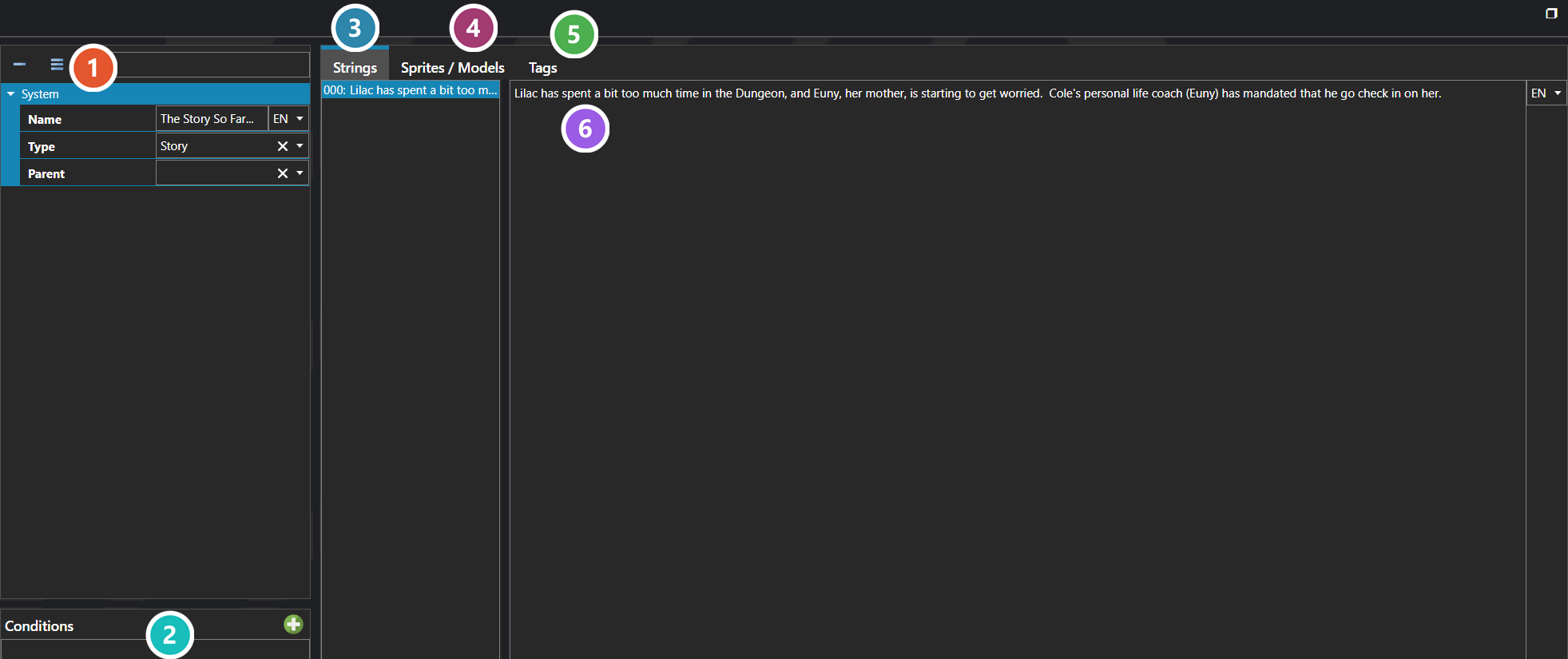
 Properties
The entry's own fields — its name, the Type it is filed under, and an optional Parent entry, which is what nests entries into a hierarchy. Every one of them is listed under Properties further down this page.
 Conditions
What has to be true before the entry is available. This is how a bestiary fills in as enemies are met, or a journal unlocks as the story advances, rather than showing everything from the start.
 Strings
The entry's text, one row per string, edited in the panel beside the list. Each string carries its own language, so the same entry holds every translation.
 Sprites / Models
Artwork shown alongside the text — a portrait for a journal entry, a battler for a bestiary page.
 Tags
Tags
Key and value pairs attached to this entry, for matching and conditional logic — see Tag Editor.
 Selected String
The selected string's own text, with its language beside it. Selecting a different row in the list swaps what is edited here.
Note: The shape of a Data Entry is intentionally generic. The Type controls what fields the entry exposes in the editor, the Strings and Character Models arrays hold whatever the type expects, and the Conditions decide whether the entry is currently enabled — it is up to the project to decide how each Data Entry Type uses these slots, which is what makes Data Entries the right home for content systems the engine does not model directly.
Note: Conditions set an entry's IsEnabled state, they do not hide it. A list bound to Data Entries renders every entry it is given, enabled or not, so an unlocked-only bestiary or quest log has to ask for that explicitly. There are two ways to do it: add a Filter on the list's context for IsEnabled equal to true, which leaves disabled entries out of the list entirely, or add a Disabled Effect on the list item template that tests IsEnabled with the condition inverted, which keeps disabled entries in place and renders them in a disabled style. Use the filter to hide locked content and the effect to show it greyed out.
Note: Conditions are evaluated per entry. A disabled parent does not disable its children, so a hierarchy that should lock as a unit needs the same conditions repeated on each entry in the chain.
Note: Tags are edited the same way wherever they appear — see Tag Editor.
Properties
System
| Name | Explanation | Type |
|---|---|---|
| Character Models | The free-form character models of the data entry. | Sprite or Model |
| Conditions | The conditions that determine whether the data entry is currently enabled. | Condition |
| Name | The name of the data entry. | String |
| Parent | The parent of the data entry. | Data Entry |
| Strings | The free-form strings of the data entry. | String |
| Tags | The tags for the data entry. | Tags |
| Type | The data entry type classification of the data entry. | Data Entry Type |
| Unique ID | The unique identifier for the data entry. | Unique ID |