Battle Backdrops
Battle Backdrops
Battle Backdrops define where a battle takes place and where its heroes and enemies stand. A backdrop is selected when a battle begins and determines both the environment the player sees and the slot layout that battlers are assigned to.
Which fields on a backdrop are actually used depends on the battle configuration. In UI-based battles, the backdrop is composited from its Background and Foreground Elements, with battlers placed in pixel coordinates relative to the center of the screen. In map-based battles, the backdrop instead renders a 3D map as the environment, with battlers placed in tile coordinates relative to the battle's focal point on that map.
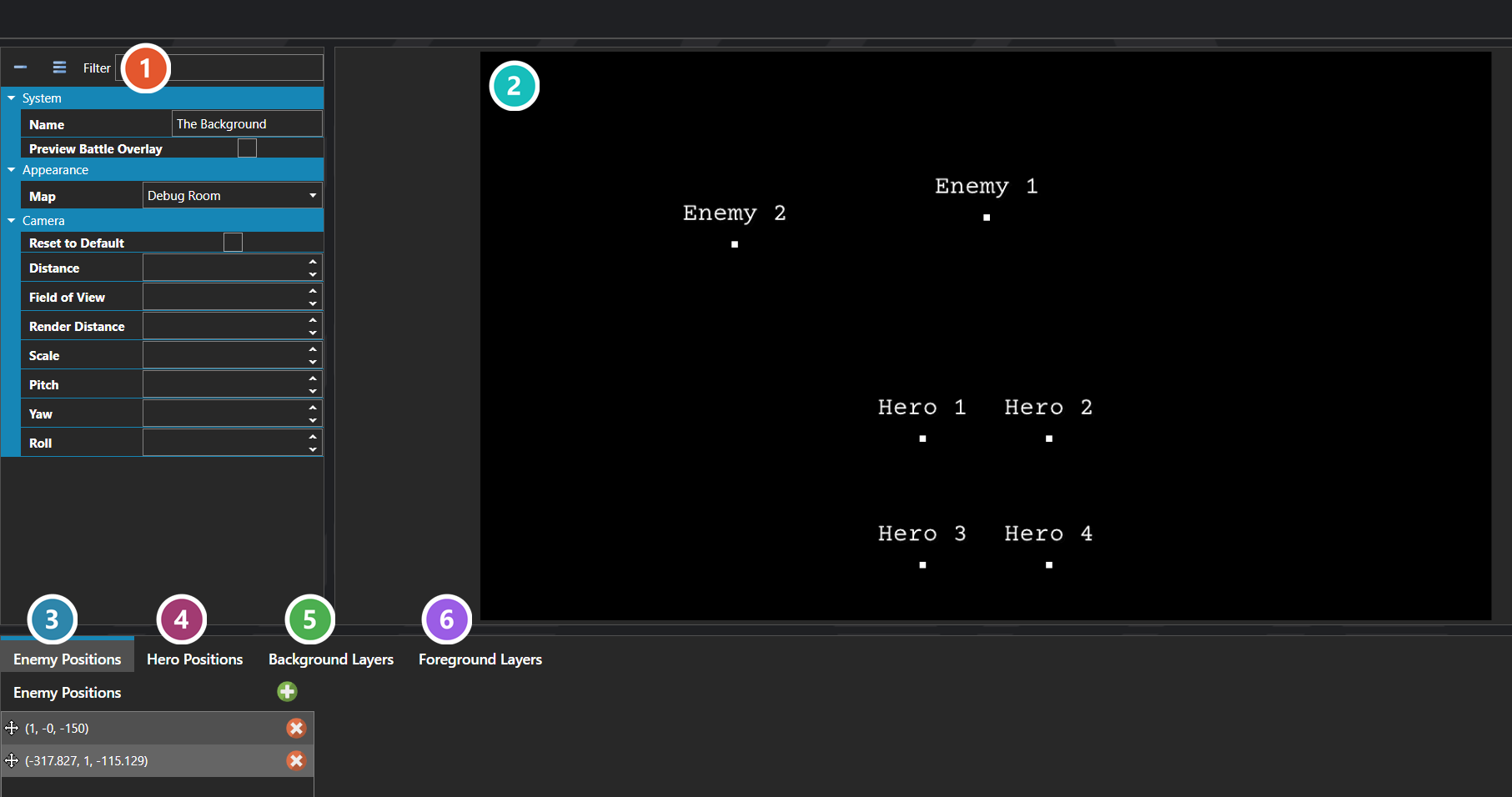
 Properties
The backdrop's own fields — the map it renders and the camera overrides applied to it. Every one of them is listed under Properties further down this page.
 Preview
How the backdrop will look in battle, with a marker for every hero and enemy slot so the layout can be judged before a battle is ever run.
 Enemy Positions
The slots enemies are assigned to, in order. Provide enough for the largest enemy formation that can use this backdrop — extra slots simply go unused.
 Hero Positions
The slots heroes are assigned to, in order. Provide enough for the largest party that can enter a battle on this backdrop.
 Background Layers
Image layers composited behind the battlers. These are only drawn in UI-based battles and are ignored entirely when the backdrop renders a map.
 Foreground Layers
Image layers composited in front of the battlers, for effects like mist or foliage. Also UI-based battles only.
Note: Background and Foreground Elements are only rendered in UI-based battles and are ignored entirely in map-based battles. The Map field is the opposite — it is only used in map-based battles and is ignored in UI-based ones. The camera overrides apply in both modes and tune the camera relative to whichever environment the battle is using.
Note: Hero and Enemy Placements are used by both modes, but the unit and origin differ. In UI-based battles each placement is a pixel offset from the center of the screen; in map-based battles each placement is a tile offset from the battle's focal point. Provide enough placement slots to cover the largest party and largest enemy formation that can use this backdrop, since extras simply remain unused.
Properties
System
| Name | Explanation | Type |
|---|---|---|
| Background Elements | 2D image or sprite layers composited behind the battlers in UI-based battles. Ignored in map-based battles. | BattleBackdropElement |
| Distance | The overridden distance of the camera. Leave empty to use the default. | Number |
| Enemy Placements | The ordered list of slots where enemies stand on the backdrop. Each slot defines a position and an optional facing direction. | BattleBackdropPlacement |
| Field of View | The overridden field of view of the camera. Leave empty to use the default. | Number |
| Foreground Elements | 2D image or sprite layers composited in front of the battlers in UI-based battles. Ignored in map-based battles. | BattleBackdropElement |
| Hero Placements | The ordered list of slots where heroes stand on the backdrop. Each slot defines a position and an optional facing direction. | BattleBackdropPlacement |
| Map | The 3D map rendered as the environment in map-based battles. Ignored in UI-based battles. | Number |
| Name | The name of the backdrop. Used to identify it in the editor and database. | String |
| Pitch | The overridden pitch of the camera. Leave empty to use the default. | Number |
| Render Distance | The overridden render distance of the camera. Leave empty to use the default. | Number |
| Reset to Default | Whether to reset the camera to the default values, ignoring any overrides on this backdrop. | Toggle |
| Roll | The overridden roll of the camera. Leave empty to use the default. | Number |
| Rotation | The rotation of the camera for the scene, based off of the default camera view. | Vector |
| Scale | The overridden scale of the camera. Leave empty to use the default. | Number |
| Yaw | The overridden yaw of the camera. Leave empty to use the default. | Number |
Battle Backdrop Element
A single image or sprite layer composited into the backdrop, positioned either in pixels or as a percentage of the screen.
Properties
System
| Name | Explanation | Type |
|---|---|---|
| Blend Mode | The blend mode of the layer. | Blend Mode |
| Color Mask | The color mask to apply to the element. | Color |
| Image | The static image associated with the layer. | Image |
| Name | The name of the layer. | String |
| Pixel Height | The height of the layer in pixels. | Number |
| Pixel Width | The width of the layer in pixels. | Number |
| Pixel X | The x coordinate of the layer in pixels. | Number |
| Pixel Y | The y coordinate of the layer in pixels. | Number |
| Relative Height | The height of the layer in screen percentage. | Number |
| Relative Width | The width of the layer in screen percentage. | Number |
| Relative X | The x coordinate of the layer in screen percentage. | Number |
| Relative Y | The y coordinate of the layer in screen percentage. | Number |
| Sprite | The sprite associated with the layer. | Sprite or Model |
| Use Relative Positioning | Whether to use measurements based on a percentage of the screen rather than pixels. | Toggle |
| Use Sprite | Whether to use a sprite instead of a static image for this layer. | Toggle |
Battle Backdrop Placement
A single slot on the backdrop where a hero or enemy stands, defining where the battler appears and which way it faces.
Properties
System
| Name | Explanation | Type |
|---|---|---|
| Direction | The facing direction to assign to the battler placed in this slot. | Direction |
| Position | The world-space position where the battler is placed on the backdrop. | Vector |
Blend Mode
| Name | Explanation |
|---|---|
| Non Pre-Multiplied | The default blend mode with standard transparency handling. |
| Additive | Adds source and destination colors together, creating a brightening glow effect. |
| Alpha-Blend | Blends source and destination using pre-multiplied alpha transparency. |
| Opaque | Renders fully opaque with no transparency. |
| Burn / Subtractive | Subtracts source color from the destination, creating a darkening burn effect. |
| Glow / Screen | Inverts, multiplies, and inverts again, creating a brightening screen effect. |
| Shade / Multiply | Multiplies source and destination colors, creating a darkening shade effect. |
| Mask (Alpha) | Multiplies the destination's alpha by the source's alpha, clipping content to the source's opaque areas. |