General
General
General defines how the project's core game systems work across the entire game. It is the catch-all configuration for everything that does not belong to a more specific category — the icon sheet and icon dimensions, save data format and slot defaults, mouse and input behavior, the default menu UI, the lifecycle scripts that run before and after loading a save, and the global scripts that drive the engine itself.
The settings here are the project-wide defaults that apply to every play session. Most projects configure these once early in development to lock in how the game presents and persists itself.
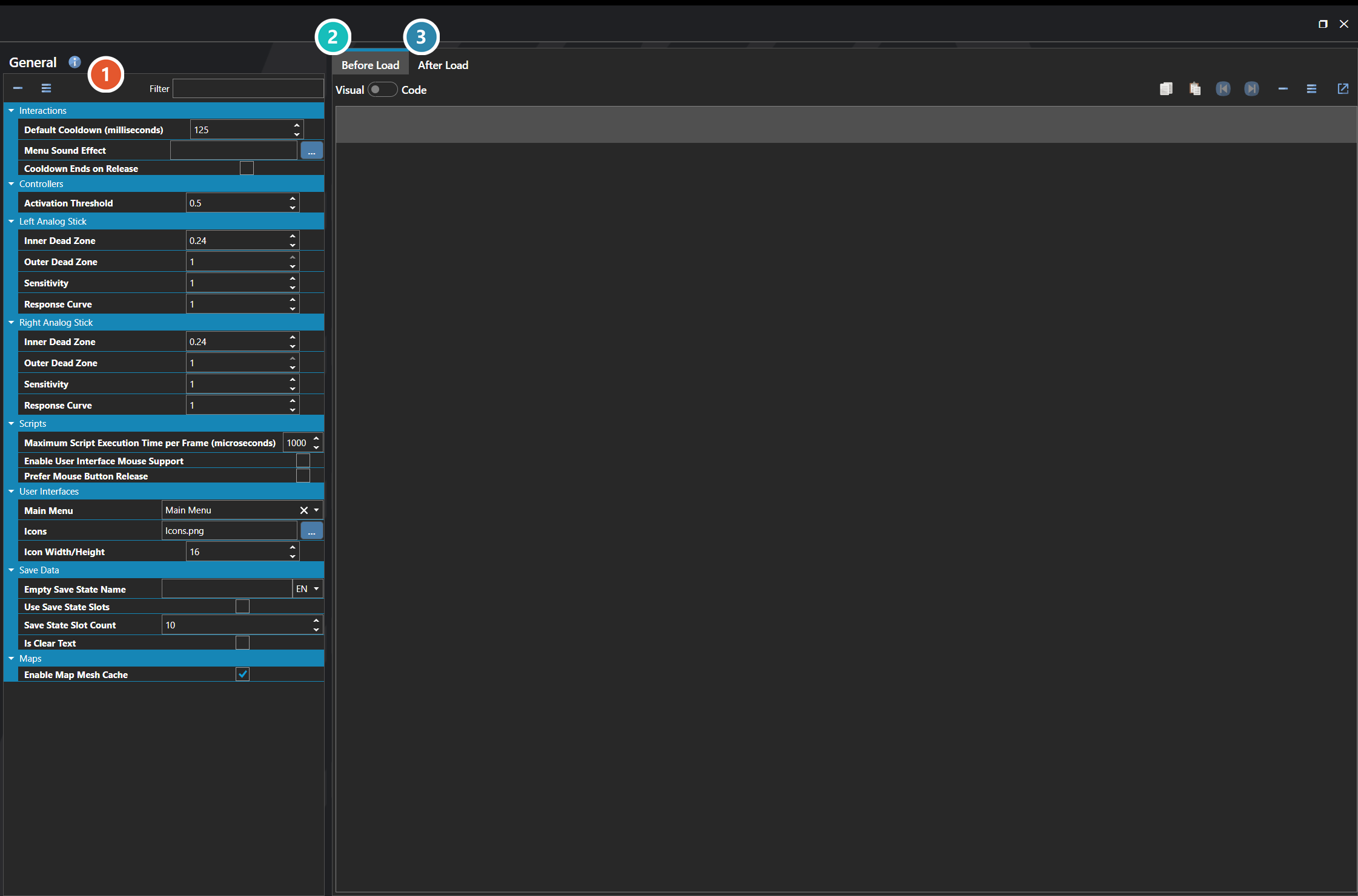
 Settings
The project-wide settings themselves, grouped into System, Interactions, Maps, Save Data, Scripts, and User Interfaces. Every one of them is listed under Properties further down this page, and the Filter box at the top narrows it to a matching name.
 Before Load

The script that runs before a save is loaded, while the previous game state is still in place. Use it for work that has to happen against the outgoing state, or to prepare data the incoming save expects.
 After Load

The script that runs after a save is loaded and the restored state is live. This is the usual place to reconcile a save with content that has changed since it was written.
Properties
System
| Name | Explanation | Type |
|---|---|---|
| After Load Script | The script executed after a save state is loaded. | Script |
| Before Load Script | The script executed before a save state is loaded. | Script |
Interactions
| Name | Explanation | Type |
|---|---|---|
| Cooldown Ends on Release | Whether virtual key cooldown begins when the key is released instead of when pressed. | Toggle |
| Default Cooldown (milliseconds) | The default virtual key cooldown in milliseconds. | Number |
| Menu Sound Effect | The sound to play when the main menu opens. | Sound Effect |
Maps
| Name | Explanation | Type |
|---|---|---|
| Enable Map Mesh Cache | When enabled, saving a map also writes a binary mesh cache (.bin) alongside the map file. The engine uses this cache to skip tile mesh generation at load time, resulting in faster map transitions. | Toggle |
Save Data
| Name | Explanation | Type |
|---|---|---|
| Empty Save State Name | The name to use on any empty save state. | String |
| Is Clear Text | Whether save data is stored in clear text, allowing the player to edit it manually. | Toggle |
| Save State Slot Count | The number of save state slots to use. | Number |
| Use Save State Slots | Whether to limit saves to a fixed number of save state slots. | Toggle |
Scripts
| Name | Explanation | Type |
|---|---|---|
| Enable User Interface Mouse Support | Whether interface elements support mouse interaction. | Toggle |
| Maximum Script Execution Time per Frame (microseconds) | The maximum time in microseconds a single script will execute per frame. Acts as a throttle for long-running scripts. | Number |
| Prefer Mouse Button Release | Whether interface mouse interactions trigger on button release instead of button press. | Toggle |
User Interfaces
| Name | Explanation | Type |
|---|---|---|
| Icon Width/Height | The dimension of the cell for an individual icon. | Number |
| Icons | The icon sheet image used throughout the engine for items, skills, and interface elements. | Image |
| Main Menu | The main menu linked to the menu virtual key. | User Interface |