Easing Function Editor
Easing Function Editor
Easing Function Editor chooses the rate of a change over time — whether a movement runs evenly, starts slowly and gathers pace, or overshoots and settles back.
Function selects the curve. Linear applies no shaping at all and takes no further settings; the others expose parameters that control how pronounced the effect is. Reverse mirrors the curve so it applies from the opposite end.
The values an easing function holds are documented under Easing Function.
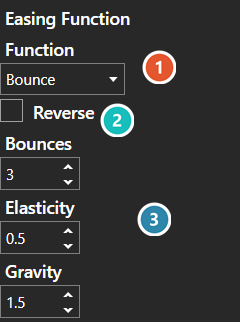
 Function
Which curve is applied. Linear applies no shaping at all and takes no further settings; the others each expose their own.
 Reverse
Mirrors the curve so it applies from the opposite end — an ease-in becomes an ease-out.
 Parameters
These belong to the chosen function and are replaced when it changes — Bounces, Elasticity and Gravity are Bounce's. Linear and Instant have none, which is why the panel looks empty on them.