Items
Items
Items are the consumable, non-equipped entries in a character's inventory — potions, scrolls, bombs, key items, and any other object the player can hold and use. An item defines what happens when it is used, where it can be used (in battle, from the menu, or both), who it can target, and how many times it can be consumed before it is removed.
When used, an item can apply trait effects directly to its targets, invoke an existing skill so that all of that skill's behavior runs through the item, or call a global script for fully custom logic. These three modes are mutually exclusive — an item is either a trait-effect item, a skill wrapper, or a script trigger.
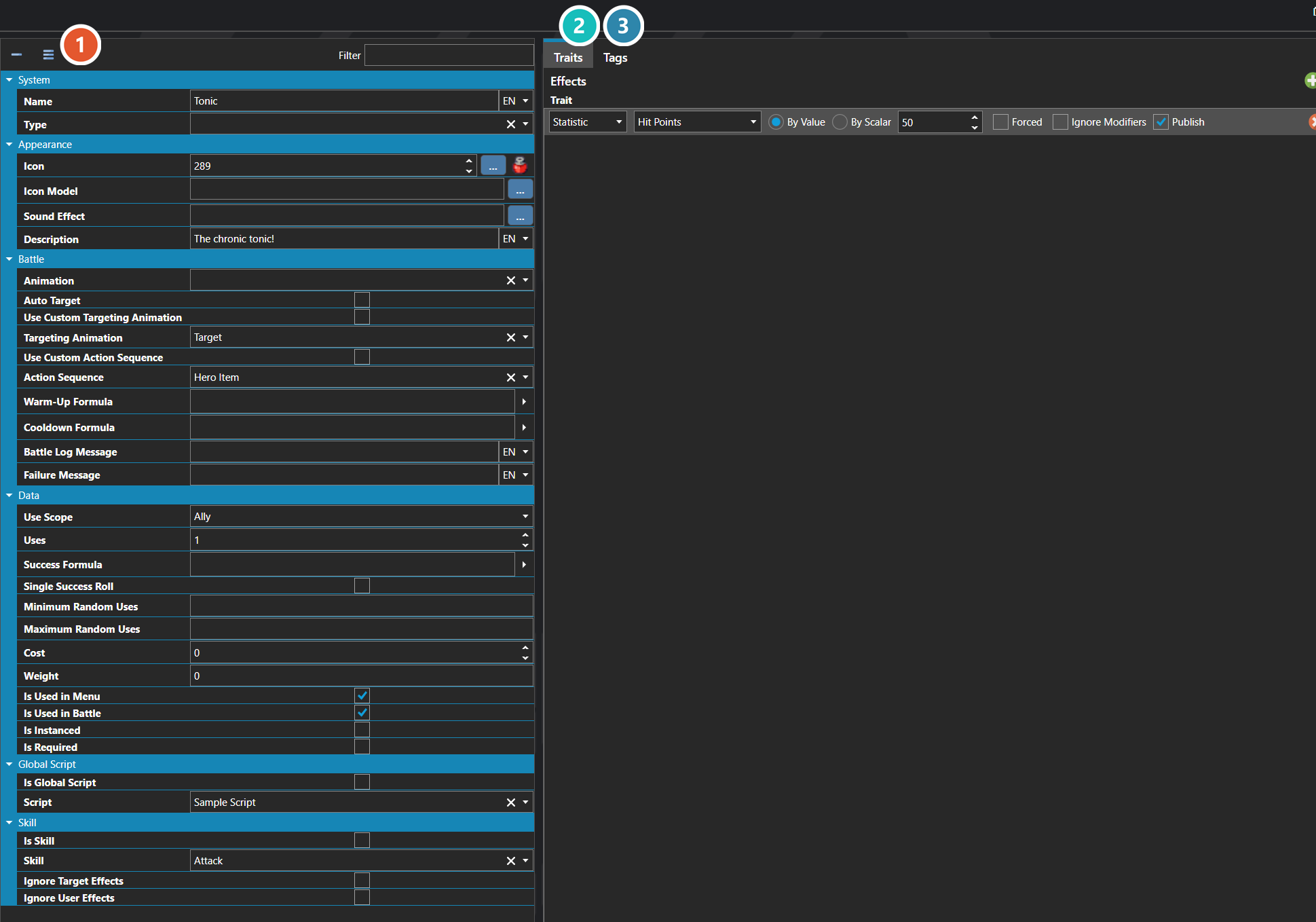
 Properties
The item's own fields — what it costs, who it can target, whether it is consumed, and how it behaves in and out of battle. Every one of them is listed under Properties further down this page.
 Traits
What using the item actually does — the healing, damage, and status effects it applies. The tab reads Traits, but the table inside it is an effect table — see Effect Table Editor.
 Tags
Tags
Free-form labels other systems can match against — see Tag Editor.
Note: Items represent the inventory entry, not the in-world appearance of a dropped object. Visual appearance, stack limits, default sound effects, and other category-wide behavior come from the item's Item Type. To restrict which characters can use an item, expose its type through the character's allowed Item Types — characters can only use items whose type is in their list.
Note: Items do not have to be consumed on use. Key items, plot triggers, and reusable tools can be configured to remain in the inventory after they are used, letting an item act more like a persistent switch or trigger than a single-use consumable.
Note: Tags are edited the same way wherever they appear — see Tag Editor.
Properties
System
| Name | Explanation | Type |
|---|---|---|
| Is Item | Whether the item has an actual item effect. | Toggle |
| Name | The name of the item. | String |
| Trait Effect Table | The trait effect table for the item. | Trait Effect Table |
| Type | The item type classification of the item. | Item Type |
Appearance
| Name | Explanation | Type |
|---|---|---|
| Description | The description of the item. | String |
| Icon | The icon associated with the item. | Icon |
| Icon Model | The icon model associated with the item. | Sprite or Model |
| Sound Effect | The sound effect played during non-battle uses of the item. | Sound Effect |
Battle
| Name | Explanation | Type |
|---|---|---|
| Action Sequence | The custom action sequence to use with the item. | Action Sequence |
| Animation | The animation to use with the item. | Animation |
| Auto Target | Whether the item automatically selects a target. | Toggle |
| Battle Log Message | The message that shows in the battle log. | String |
| Cooldown Formula | The cooldown formula for the item. | Formula |
| Failure Message | The message that shows when the item fails. | String |
| Targeting Animation | The custom targeting animation to use with the item. | Animation |
| Use Custom Action Sequence | When enabled, the item plays a specific Action Sequence in battle instead of the default item-use sequence. | Toggle |
| Use Custom Targeting Animation | Whether to use a custom targeting animation. | Toggle |
| Warm-Up Formula | The warm-up formula for the item. | Formula |
Data
| Name | Explanation | Type |
|---|---|---|
| Cost | The cost associated with the item. | Number |
| Is Instanced | Whether the item should be instanced. | Toggle |
| Is Required | Whether the item cannot be removed from the inventory. | Toggle |
| Is Used in Battle | Whether the item can be used in battle. | Toggle |
| Is Used in Menu | Whether the item can be used in a menu. | Toggle |
| Maximum Random Uses | The maximum random uses of the item. | Number |
| Minimum Random Uses | The minimum random uses of the item. | Number |
| Single Success Roll | When enabled, the success formula is evaluated once and the result is applied to all targets uniformly. | Toggle |
| Success Formula | The success formula to use the item. | Formula |
| Use Scope | Who the item is allowed to target when used. | Use Scope |
| Uses | The number of times the item can be used before it is consumed and removed from the inventory. | Number |
| Weight | The weight of the item, if valid. | Number |
Global Script
| Name | Explanation | Type |
|---|---|---|
| Is Global Script | Whether to execute a script during the item use. | Toggle |
| Script | The script to execute when the item is used. | Script |
Skill
| Name | Explanation | Type |
|---|---|---|
| Ignore Target Effects | Whether the skill ignores the target effects. | Toggle |
| Ignore User Effects | Whether the skill ignores the user effects. | Toggle |
| Is Skill | Whether the item invokes a skill usage. | Toggle |
| Skill | The skill to execute when the item is used. | Skill |
Use Scope
| Name | Explanation |
|---|---|
| None | |
| User | |
| Ally | |
| Random Ally | |
| User and Allies | |
| Enemy | |
| Random Enemy | |
| All Enemies | |
| Everyone | |
| Anyone | |
| Random |