Entity Definitions
Entity Definitions
Entities are the reusable interactive objects placed on maps — NPCs, enemies on the field, doors, switches, treasure chests, signposts, moving platforms, and any other map element that needs to react, move, or run logic. An entity defines its appearance, its movement behavior, the scripts that run in response to events, and the conditions that decide when each script page is active.
Entities defined here in the database act as templates: a single Entity can be placed on any number of maps, and each placement inherits the template's behavior unless overridden. This is what allows the same shopkeeper, guard, or treasure chest to appear in multiple locations without re-authoring it for each one.
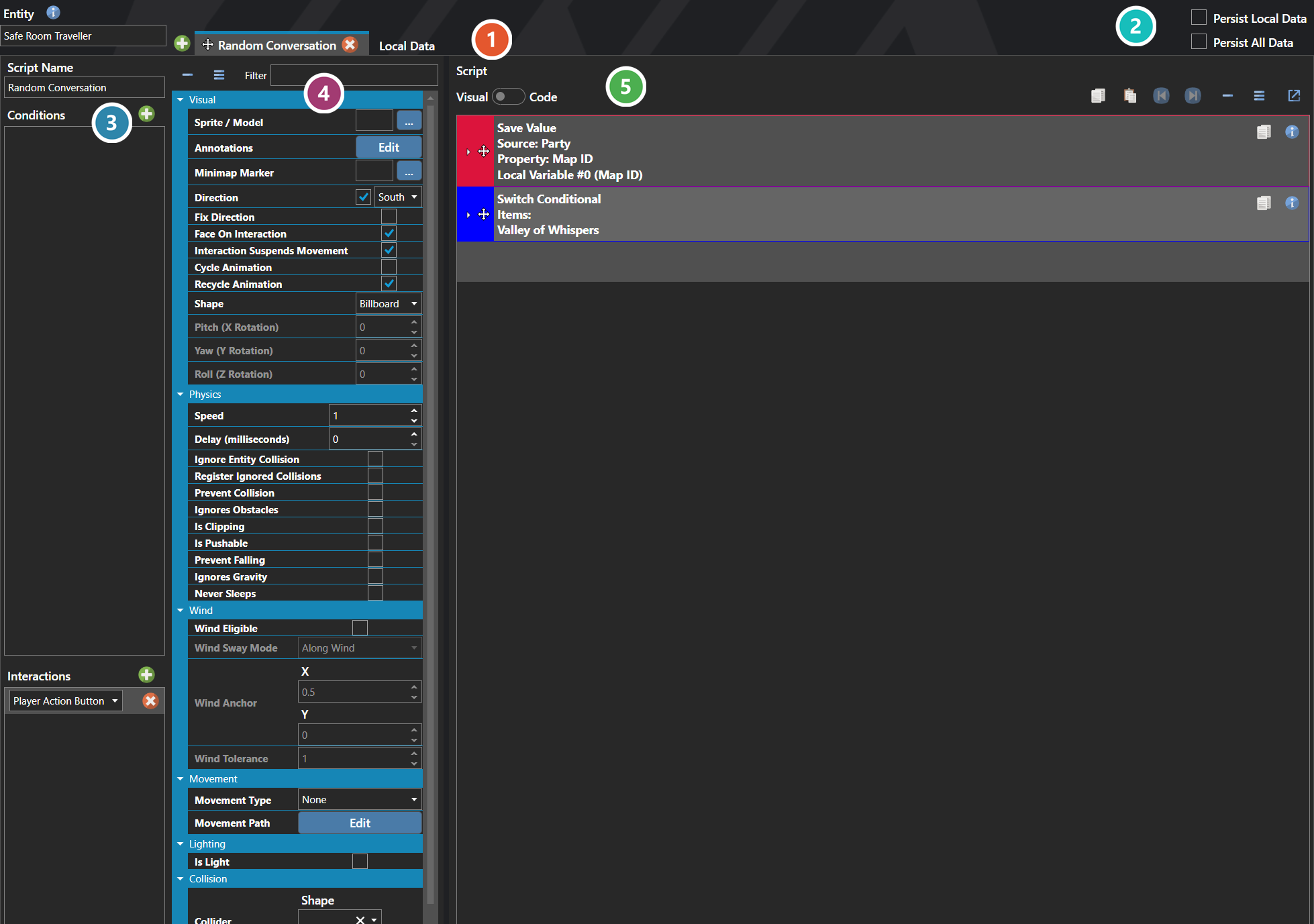
 Scripts and Local Data
An entity definition holds as many scripts as it needs, one per tab, plus a Local Data tab for the switches and variables belonging to this entity alone.
 Persistence
Is Local Data Persisted keeps this entity's own switches and variables across map transitions; Is All Data Persisted keeps its position and state as well.
 Conditions and Interactions
What has to be true for the selected script to run, and what sets it off. This one is triggered by the Player Action Button — the player pressing confirm against the entity.
 Properties
The entity's own fields, grouped by concern — Visual for its sprite or model, facing and shape, Physics for speed and the collision flags, Wind, Movement for its patrol type and path, Lighting, and Collision for its collider. Every one of them is listed under Properties further down this page.
 Script
The commands the selected script runs, authored the same way as any other script — see Script Editor.
Note: Entities are organized into Script Pages — each page has its own activation conditions, movement settings, and script. The active page is whichever one's conditions currently pass, which is how an entity can change behavior based on switches, variables, party state, or progress through the game without ever needing to be replaced.
Properties
System
| Name | Explanation | Type |
|---|---|---|
| Category | The category of the entity, for organizational purposes in the editor. | String |
| ID | The numeric ID of the entity on the map. | Number |
| Is All Data Persisted | Whether all runtime data (position, state, local data) persists across map transitions. | Toggle |
| Is Local Data Persisted | Whether local switches and variables persist across map transitions. | Toggle |
| Locals | The local switches and variables belonging to this entity. | Local and Global Data |
| Name | The display name of the entity. | String |
| Position | The X, Y, and Z coordinates of the entity on the map. | Vector |
| Scripts | The scripts attached to the entity, each with their own conditions, interactions, and commands. | Entity Script |
| Tags | Key-value pairs for extensible data on the entity. | Tags |
| Unique ID | The unique identifier. | Unique ID |
Entity Script
Entity scripts define the visual appearance, physics, movement behavior, conditions, and interactions of an entity on a map.
Properties
System
| Name | Explanation | Type |
|---|---|---|
| Collider | The settings for the dimensions of the entity collider. Values are measured in tiles. | Collider |
| Commands | The commands to execute when the script runs. | |
| Cycle Animation | Whether to animate the entity automatically. | Toggle |
| Delay (milliseconds) | The delay between movement actions. | Number |
| Direction | The direction the entity is facing. | Direction |
| Face On Interaction | Whether the entity will face the player on interaction. | Toggle |
| Fix Direction | Whether to keep the entity facing its current direction. | Toggle |
| Ignore Entity Collision | Whether to ignore collision between other entities. | Toggle |
| Ignores Gravity | Whether the entity ignores the effects of gravity. | Toggle |
| Ignores Obstacles | Whether or not the entity ignores collisions from terrain tags or tile collisions. | Toggle |
| Interaction Suspends Movement | Whether to suspend the movement pattern when interaction occurs. | Toggle |
| Is Clipping | Whether the entity operates independently of physics. | Toggle |
| Is Direction Updated | Whether direction updates during movement. | Toggle |
| Is Pushable | Whether the entity can be pushed. | Toggle |
| Light | The light attached to the entity. | Light |
| Movement Type | The type of movement the entity will perform. | Entity Movement Type |
| Name | The display name. | String |
| Never Sleeps | Whether the object never sleeps during physics updates. | Toggle |
| Prevent Collision | Whether the entity tries to avoid occupying the same tile as another entity. | Toggle |
| Prevent Falling | Whether the entity tries to avoid falling. | Toggle |
| Recycle Animation | Whether to continuously animate the entity. | Toggle |
| Register Ignored Collisions | Whether to register collisions even when ignored. | Toggle |
| Rotation | The rotation of the entity model. | Vector |
| Shape | The shape of the entity in 3D. | Sprite Shape |
| Speed | The speed multiplier of the entity. | Number |
| Sprite / Model | The sprite or model of the entity on maps. | Sprite or Model |
Wind
| Name | Explanation | Type |
|---|---|---|
| Wind Anchor | The anchor point on the sprite for wind sway, in normalized sprite-local coordinates. (0.5, 0) is bottom-center, useful for trees and signs. (0.5, 1) is top-center, useful for hanging banners and lanterns when paired with the Rotate Around Anchor sway mode. | Vector |
| Wind Eligible | Whether the entity is influenced by wind. | Toggle |
| Wind Sway Mode | The mode of sway applied to the entity when wind is enabled. | Wind Sway Mode |
| Wind Tolerance | A multiplier on the map's wind strength applied to this entity's sway. | Number |
Entity Movement Type
| Name | Explanation |
|---|---|
| None | The entity does not move on its own. |
| Random | The entity moves randomly in available directions. |
| Path | The entity follows a predefined movement path. |
Wind Sway Mode
| Name | Explanation |
|---|---|
| Along Wind | Top vertices offset opposite to the incoming wind direction, then bob back. Models physical sway — a tree leaning with the wind. |
| Across Wind | Top vertices wag perpendicular to the wind direction. Reads as a flag flapping or grass shimmering across the breeze. |
| Rotate Around Anchor | The sprite rotates back and forth around its anchor like a pendulum. Useful for hanging signs, banners, and lanterns. |