Tilesets
Tilesets
Tilesets are the collections of tile images that maps draw from to build their terrain and structures. Each tileset bundles together a fixed set of slots — animated tiles, terraforming tiles that auto-shape against neighbors, structural tiles for walls and buildings, and flat tiles for everything else — along with the metadata that controls how each slot renders, animates, and interacts with the world.
A map references a tileset to define what its tiles look like; changing the tileset on a map swaps every tile through the same indices, which is what allows a single map layout to be re-skinned across multiple tilesets without re-painting it.
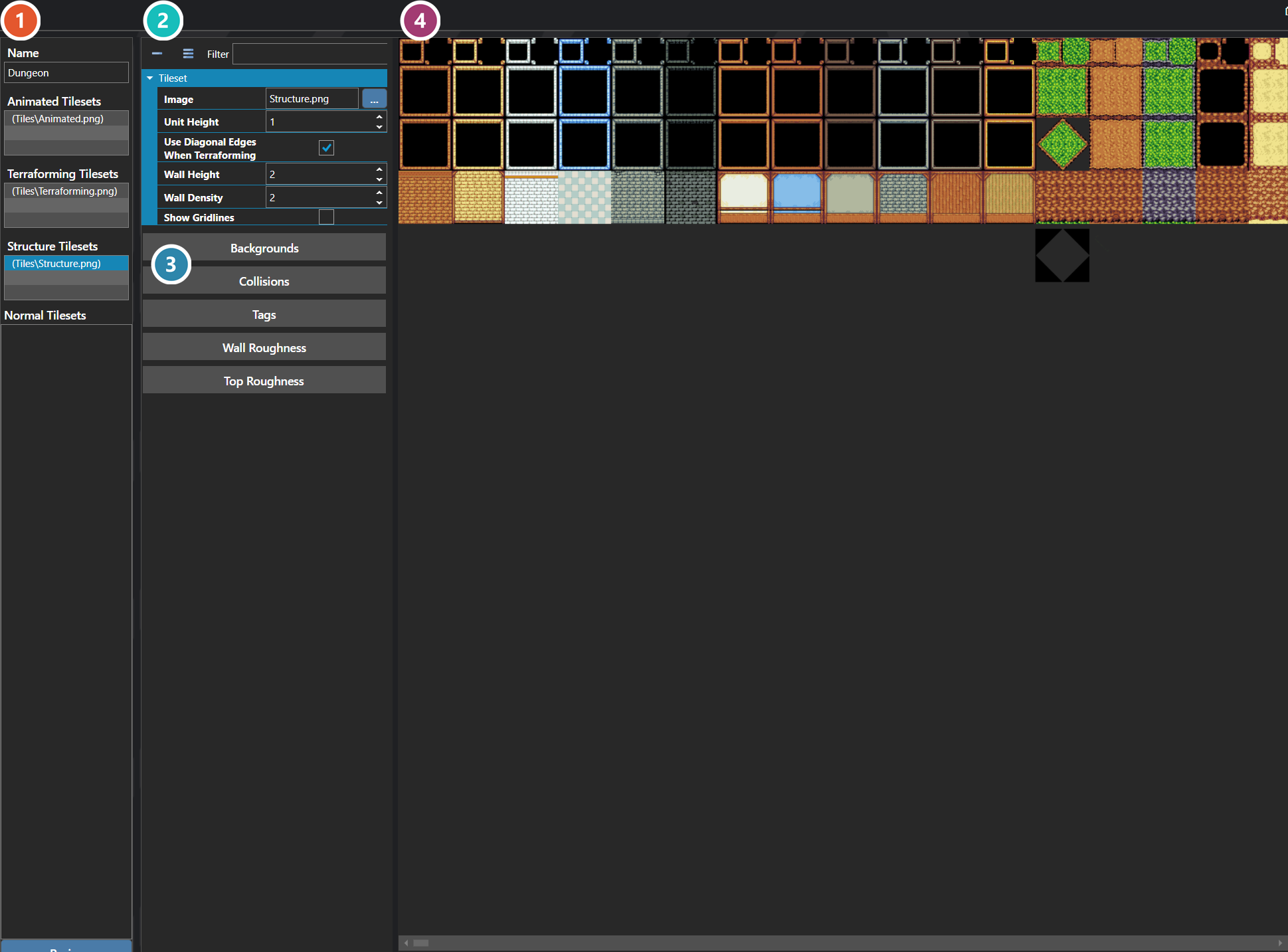
 Tileset Slots
The images that make up this tileset, grouped by how they behave: Animated, Terraforming, Structure and Normal. Select a slot to edit it.
 Properties
The selected slot's own fields — its image, unit height, and how it behaves when terraformed. Which fields appear depends on the slot's kind.
 Modifiers
Per-tile settings, each opening its own editor — backgrounds, collisions, tags, and the roughness applied to walls and tops. A Structure slot offers Wall Roughness; other kinds offer a different set. Collision covers a whole tile by default; Advanced Collision opens each quadrant separately, for half-tiles and diagonals. On a Terraforming slot every variant in the pattern carries its own collision, so painting one variant leaves the rest open.
 Preview
The tileset image itself, where individual tiles are picked out to apply the settings above.
Note: A tileset has three Animated slots, three Terraforming slots, and three Structure slots, plus an unlimited number of Flat slots. Animated slots cycle through frames at runtime, Terraforming slots auto-shape against their neighbors to produce smooth edges between terrain types, Structure slots build vertical pieces like walls and buildings, and Flat slots are simple non-animated images for everything else.
Properties
System
| Name | Explanation | Type |
|---|---|---|
| Flat Slots | All of the flat tileset slots. | TilesetDetails |
| Name | The name of the tileset. | String |
Tileset Details
Properties
System
| Name | Explanation | Type |
|---|---|---|
| Image | The image associated with the tileset slot. | Image |
| Is Terraforming | Whether the slot should terraform. | Toggle |
| Unit Height | The scalar to apply to a tile with height. | Number |
| Use Diagonal Edges When Terraforming | Whether to use diagonal edges on corners. | Toggle |