Transition Editor
Transition Editor
Transition Editor configures the animation between one screen and the next — what the player sees as a scene arrives or leaves.
Transition chooses the effect, and the settings beneath it change to match what that effect needs. Duration sets how long it runs, and the Easing Function shapes how it progresses over that time rather than advancing evenly.
Enter and Exit are configured separately, so a screen can arrive one way and leave another.
The values a transition holds are documented under Scene Transition.
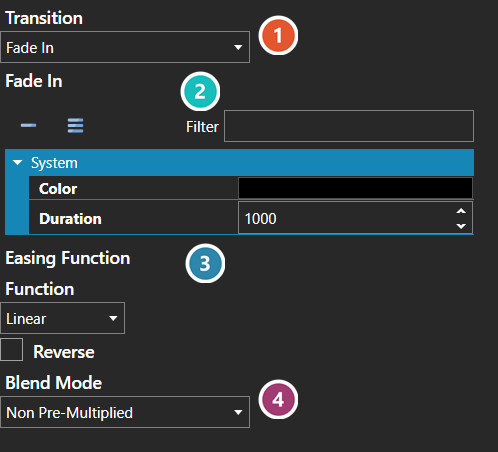
 Transition
Which effect plays. Everything below it follows from this choice.
 Settings
The settings belong to the chosen transition, so they are replaced when it changes — a fade asks for a colour and a duration, another effect asks for something else entirely. The full set for each is under Scene Transition.
 Easing Function
Shapes how the transition progresses over its duration rather than advancing evenly — see Easing Function Editor.
 Blend Mode
How the transition's own drawing is composited over the scene beneath it.